


What is a help desk software?
A helpdesk software is a tool that allows companies to manage support services much more efficiently and quickly. It provides automation capabilities to accelerate redundant and repetitive tasks such as acknowledging a customer question and improving the effectiveness of question resolution with an efficient ticketing system. By accelerating the entire customer support process, this category of IT solutions for companies improves the customer experience and results in rationalization and optimization of resources.
Many help desk software offer advanced features such as automatic ticket creation, priority management and the ability to view detailed reports to evaluate and monitor the performance of various company divisions.
Help desk software often integrates process performance monitoring capabilities, allowing companies to spot any technical issues reported by customers and resolve them promptly. This helps ensure reliable service and increases your customer loyalty.
Some of the most important features to take into consideration when choosing help desk software are the following:
- CUSTOMIZATION: The best Help Desk software is designed to adapt to the specific needs of your business.
- SCALABILITY: The scalability of software consists of the ability with which a system keeps up with your needs.
- LANGUAGE SUPPORT: It is very important to choose a strategic partner who speaks the same language as you.
- WORKFLOW: automation through logical and customized workflows allows you to optimize all business flows.
- EASE AND USABILITY: To be efficient, software must first be intuitive and easy to use so that it can simplify your work as much as possible!
Why do you need a help desk software?
Customer experience, we all know, is the very essence of a business. Without a satisfied or happy customer, no number of products or services can help you grow. Effectively selling your product or service and keeping customers coming back to you for more information – this is what a business aspires to do. And for this there are no shortcuts other than offering the best customer experience.
Handle customer issues promptly.
Help desk software allows companies to offer reliable support services to customers and, as a result, improve customer satisfaction.
Typically, companies use comprehensive helpdesk software to manage internal and external support services. This will allow your employees to focus on more profitable requests and provide more effective support.
Help Desk software also offers an intelligent priority management system, assigning certain levels of urgency to requests so that critical situations can be responded to promptly, thus improving customer satisfaction.
Automate tasks and streamline processes for better efficiency.
Each help desk involves a series of redundant, repetitive, and time-consuming activities, which do not create added value in economic terms for the business. These include sending confirmations of complaints or questions to customers upon receipt of their input, sending notifications to support staff to follow up on pending requests, and much more. Task automation features allow you to mechanize and speed up all these tasks, leaving you more time for more profitable tasks.
Deepser comes with stunning automation features that allow you to create tasks, prioritize them, provide timely responses to support requests, and even manage your workload more efficiently.
Learn more about your customers through data analytics.
Helpdesk software also offers the long-term benefit of getting closer to your customers. With the help of the analyzes generated by your software, you will be able to obtain lots of in-depth information about your customers, such as the kinds of services and products they value, the kinds of things they don’t value, and so on.
This will allow you to discover more about each of your customers and gain additional knowledge to incorporate into your tailored marketing activities.
Unify all support channels in one place
Helpdesk software systems allow managers to manage multiple support channels from one place. Through proper data integration and synchronization, queries and complaints received from any channel are channeled into the platform and actions can be taken promptly.
All your data collected in a safe place.
The security aspect is also a fundamental component when choosing help desk software. These systems offer advanced encryption and authentication capabilities to protect customer information from unauthorized access, ensuring your customers’ trust and security.
In summary, well-designed and implemented Help Desk software is an invaluable asset for any business aiming to provide high-quality customer service and maintain the trust of its customers.
What are the differences between help desk software and CRM software?
Help desk software and Customer Relationship Management software (better known as CRM) are both essential tools for companies that want to improve customer service management and strengthen relationships. However, they focus on different aspects and have unique characteristics that distinguish them from each other.
A help desk software is primarily designed to handle buyer inquiries and provide technical support. Customer care representatives use this type of software to log, track and resolve issues efficiently. Help desk systems typically provide features such as ticket management, workflow automation, request prioritization, and support performance analysis tools. This software is focused on managing requests and optimizing support processes to ensure a quick and effective response to consumer needs.
On the other hand, CRM software focuses on relationship management more broadly. While it can also include help desk features, such as interaction tracking and ticket management, its primary goal is to improve relationship management. CRM software allows companies to maintain a centralized customer database, which includes detailed information about interactions, preferences and purchasing history. This data can be used to personalize interactions, identify cross-selling or up-selling opportunities, and improve customer loyalty.
Purpose of the software
One of the key differences between the two is customer orientation. While help desk software focuses primarily on request management and technical support, CRM extends to the entire life cycle of them. CRM systems help manage sales, marketing, after-sales support and other aspects of business relationships. This means that CRM software can be used by different departments such as sales, marketing, customer support and after-sales services to manage their interactions more efficiently.
Data management
Additionally, another key difference between the two is the approach to data management. While help desk software focuses primarily on information related to inquiries and troubleshooting, CRM maintains a broader database that includes information on contacts, sales opportunities, purchase history, and other business interactions. This broader data allows companies to better understand buyer behaviors, identify market trends, and make data-driven decisions to improve overall business performance.
Customization
Finally, another difference can be seen in the approach to customization. CRM software is often designed to offer a holistic view, allowing companies to personalize interactions based on customers’ individual preferences and needs. On the other hand, while help desk systems may offer some customization features, their focus remains on efficiently handling requests and providing timely solutions.
In summary, while both help desk and CRM software are critical for businesses looking to improve customer engagement and provide high-quality service, they are distinguished by their primary focus. Help desk software is primarily oriented towards managing requests and technical support, while CRM software is designed to improve relationships through comprehensive and personalized management of business interactions. Adopting one or both types of software depends on your company’s specific needs and relationship management goals.
How do you choose the right help desk software?
If you’re trying to choose the right help desk software for your business, it’s crucial to take several key aspects into consideration. First, it’s crucial to fully understand the specific needs of your business. This means evaluating the volume and complexity of customer requests, as well as the number of support agents needed to handle them. A clear understanding of your needs will help focus your search on software that meets the specific requirements of your business.
Below is a list of aspects to take into consideration:
- Ease of use: software should be intuitive for both employees and customers. An understandable user interface reduces training time and promotes efficient use of the system.
- Smart ticket management: workflow automation are central features. The system should allow for easy ticket creation, automatic assignment based on operator skills, and tracking of ticket status.
- Task automation: helps streamline support processes, minimizing human errors and ensuring timely responses to customer requests.
- Integrated platform: Also consider the different support channels offered by the help desk software. From email and chat support to phone interactions and social media, the software should be able to integrate all these sources into one platform. This centralizes requests, greatly simplifying multi-channel management.
- Acquisition of know-how: having a solid knowledge base is equally important. An effective help desk system should enable the creation and management of a large knowledge base containing articles, FAQs and guides. These materials help customers solve common problems on their own, thereby reducing the team’s workload.
- Data analytics tools: Reporting is key to evaluating employee performance. These tools provide crucial data on average resolution time, request trends and customer satisfaction. The insights gained from these analyzes can guide business decisions to further improve support services.
- Technical support: The customer support offered by the identified partner is essential to resolve any technical problems promptly and ensure smooth operation of the system.
In conclusion, choosing the right help desk software requires careful evaluation of your specific business needs, considering aspects such as ease of use, ticket management, support channels, knowledge base, analytics tools, scalability, and customer support. By taking all these aspects into consideration, you will be able to select a help desk solution that is perfectly suited to your company’s needs.
The 10 best help desk software
Deepser
The IT software that makes your life easier
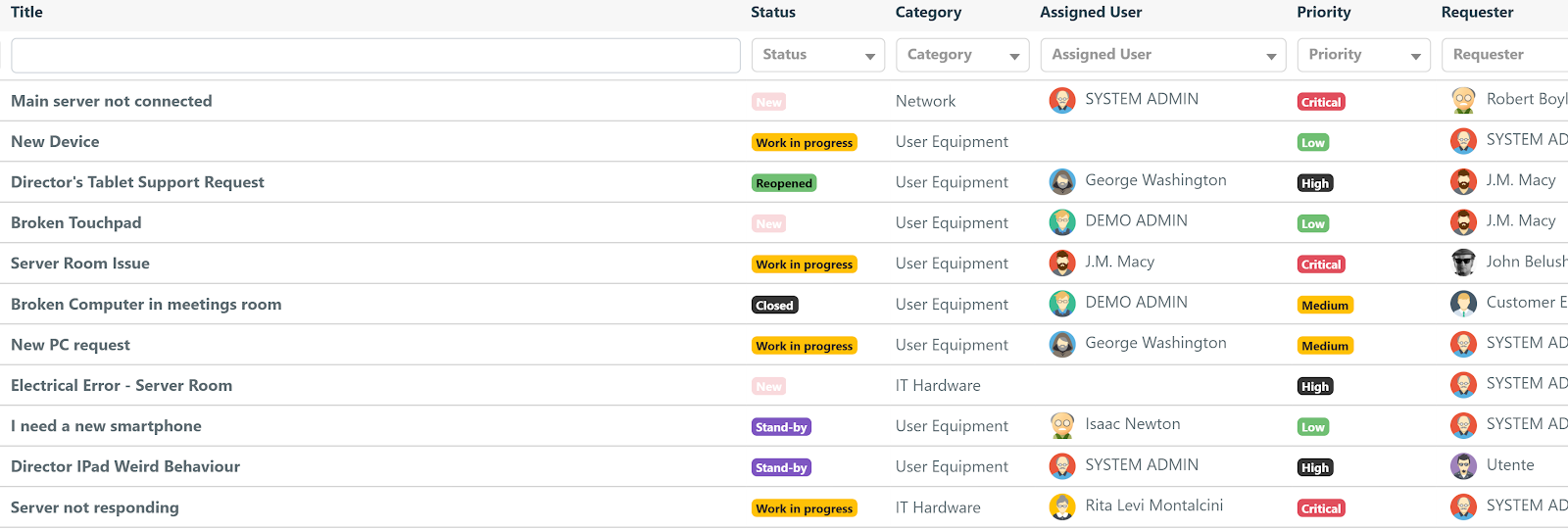
Deepser brings together the best of all helpd esk and ITSM software on the market, offering a modular and customized solution that adapts to your needs and those of your business.
Optimizes your work processes for support, sales, and IT management. We are the software that will help you overcome all your challenges, you just have to try it.
Take advantage of this unmissable opportunity and see for yourself the enormous potential of our software, try the free demo, you won’t regret it!
Deepser is here to make your work easier.
Our all-in-one, low code/no code, ITIL-compliant ITSM software has the interesting ability to adapt to any type of business to better manage your work process by aligning with any of your requests. We are here to help you achieve your goals!
Assist your customers
You will be fully accompanied by complete helpdesk features starting from the Starter license. You will be able to track tickets, categorize them, assign tasks, generate real-time reporting and much more.
Manage your database and IT infrastructure
You will be able to monitor company IT resources, coordinate them, connect them, and centralize them in a customizable database. Also having the possibility of using integrations to communicate between the different modules.
Follow sales processes and manage customer relationships
You will have the right tools to manage and obtain quality relationships with your customers, cooperate with the entire work team. Furthermore, managing to respect deadlines, monitor contracts and expose the services you offer to anyone.
Optimize workflows
Workflows will help you improve and standardize work procedures to save time and money and therefore increase productivity.
Customization
You can customize Deepser as you need:
- Custom fields: you will have access to hundreds of work fields already present in the product and you can even create new ones;
- Ticket Form: you will select the information to request and display based on the category of the open ticket
- Grids: you will decide which information to display by changing its position;
- Multiple SLAs: you can define the parameters to use for each service, customer, etc.;
- Workflows: they will be unlimited, configurable based on your business processes;
- User portal: you can customize it based on the user/customer who accesses the services for which it is enabled;
- Portal Designer: you will be able to customize the user portal with a simple drag & drop and insert Knowledge Base articles, videos, lists, assets in use, announcements and much more.
Zen desk
Zendesk offers a modern HR and IT experience and saves time with convenient automations and streamlined workflows. This help desk ticketing software streamlines internal and external support. Empower your IT department with software that alleviates common pain points, diverting more tickets and speeding resolution times.
Freshdesk
Freshdesk is a cloud-based helpdesk system that offers powerful customer service solutions. Freshdesk unifies conversations from email, phone, web, chat and social and helps you resolve issues across channels effortlessly. With Freshdesk you can also automate workflows, offer convenient self-service options, manage service level agreements, and generate reports.
Service Cloud 360
Every interaction with this software, from messaging, phone, video and in-person, is powered by intelligent automation and collaborative employee experiences. With unified data across every department, Service Cloud 360 enables pioneers around the world to gain a complete view of every customer and take their engagement to the next level.
SysAid
SysAid’s help desk solution offers a platform from which you can manage all your IT support. In one tool you can find all the essential functions you need, including: ticket management, IT asset management functions, self-service portal and more.
ManageEngine ServiceDesk Plus
ManageEngine ServiceDesk Plus is helpdesk and asset management software. It offers an integrated package with incident management, asset tracking, purchasing, contract management, self-service portal and knowledge base available at an affordable price. ManageEngine ServiceDesk Plus is available both on premise and cloud.
OneDesk
One Desk software combines help desk and project management functions into a single application. Designed for SMEs and departments of large enterprises. This easy-to-use, feature-rich and highly configurable software can manage both tickets and task workflows.
Freshservice
Freshservice is an online IT helpdesk that offers ticket and resource management user experience, such as automatic discovery of new resources, configuration management and impact analysis. Incident, problem, change, release, and knowledge management.
Pylon
Pylon is a customer support platform designed specifically for B2B customer support. It consolidates several customer support tools into a single solution, offering features such as: ticketing systems, chat widgets, Knowledge Base, AI support, and Customer Portal.
Zoho desk
Zoho Desk is cloud-based help desk software that helps businesses build stronger relationships with customers. Thanks to Zoho Desk you will be able to view and respond to all customer requests, from any channel and from a single screen. These features combine email, social media, live chat, phone calls, and web forms.
Jira service management
Jira Service Desk is a service desk software that anyone can use, configurable by the administrator and equipped with everything the IT team needs: automation rules, SLAs, real-time reporting and ITIL certified processes such as incidents, problems and change management.
Try our help desk software for free
We are pleased to offer you the opportunity to try our help desk software for free, a powerful tool designed to improve the value of your service and strengthen relationships with your customers.
Our free demo gives you access to all the key features of our software, allowing you to experience for yourself how Deepser can transform the way your business handles requests and provides support.
Our help desk software is designed to improve the efficiency of your customer service and ensure customer satisfaction. Try our demo for free and discover how our software can transform the way you manage customer requests, reducing response times and optimizing multi-channel support.
Don’t miss the opportunity to provide exceptional service to your customers. Sign up now for our free demo and start your journey to more efficient and effective customer service!



