

In this article, we will see why adopting dedicated project management software is essential for the complete management of projects and for planning all their activities.
Project management software is now a valuable resource for businesses of all sizes as it helps us achieve a better service, respecting objectives, delivery time, and budget.
What is project management?
Project management is the set of methodologies and techniques applied in project planning and controlling to achieve strategic objectives through a correct management of resources and costs. A Project Management software gives you a clear vision of your projects, goals, and resources at disposal.
Key Phases of Project Management
Project management is structured into several essential phases, each playing a crucial role in transforming an idea into a tangible result. Following a systematic approach ensures better control over every aspect of the project, ultimately driving its success.
Main Stages:
Project Initiation
This marks the starting point, where requirements are identified and key objectives are defined.
The Project Manager plays a central role, overseeing planning, execution, monitoring, and closure. Beyond coordinating the team and managing resources, they establish the project scope and create a guiding document that outlines goals, expectations, and stakeholder roles. The ultimate aim is to complete the project on time, within budget, and while meeting quality standards.
Planning
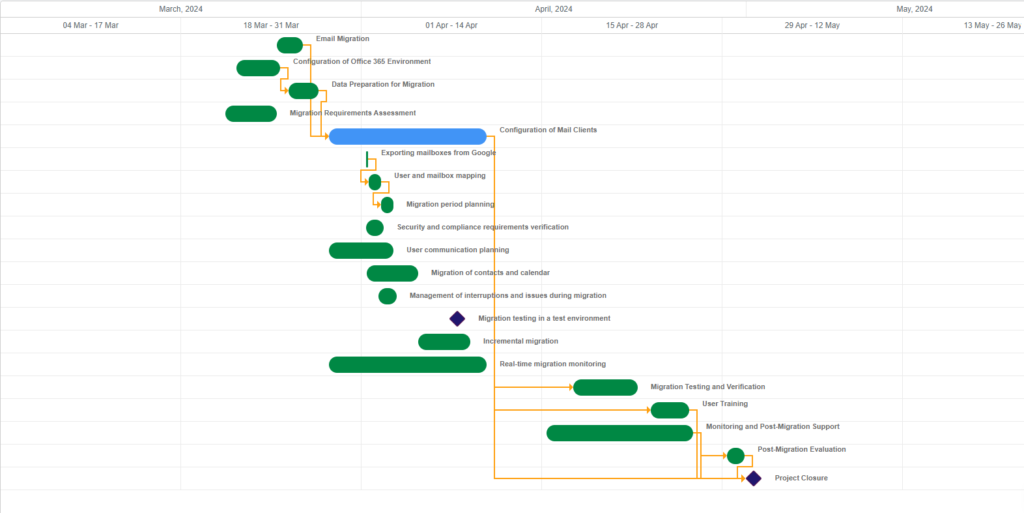
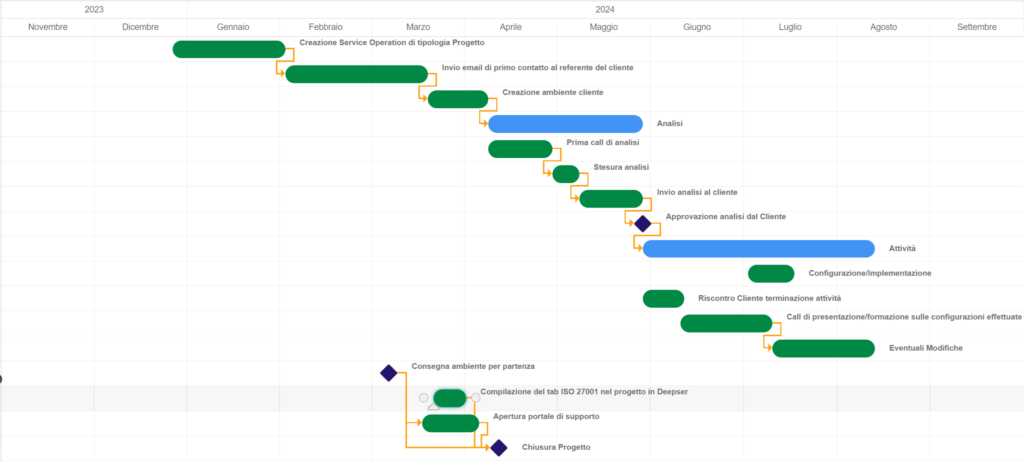
Often considered the most strategic phase, planning involves developing a detailed roadmap that outlines timelines, resources, costs, and potential risks. Tools like the Gantt chart and responsibility matrices help structure activities clearly and efficiently.
Execution
This is where the project plan comes to life. The team carries out the planned tasks, while the Project Manager ensures coordination and progress tracking. Effective communication is key in this phase to swiftly address challenges and maintain alignment with project objectives.
Monitoring & Control
Running alongside execution, this phase focuses on quality control and deviation management. The Project Manager tracks performance indicators to measure progress and, when necessary, adjusts the course to keep the project aligned with the initial plan.
Closure
At this final stage, the project is officially completed. The results are reviewed, key takeaways are documented, and any outstanding contractual obligations are settled. This step is essential for learning and improvement, ensuring that insights gained can be applied to future projects.
Project Management Methodologies
Project management relies on a variety of well-established methodologies that provide structure and guidance for initiatives of all complexities. Each approach offers unique characteristics and advantages, but all share the common goal of enhancing efficiency and productivity throughout the project lifecycle.
Waterfall Methodology
One of the most traditional and widely used methods is the sequential approach, known as the Waterfall model. This methodology breaks the project down into clearly defined phases that follow a logical sequence—from initiation to closure, passing through planning, execution, and monitoring. Waterfall is particularly well-suited for large-scale projects with stable and well-defined requirements.
Scrum & Kanban
Unlike the rigid structure of Waterfall, Agile methodologies such as Scrum and Kanban emphasize flexibility and adaptability to change. These approaches are based on iterative and incremental cycles, enabling teams to deliver small, frequent product updates while staying aligned with evolving customer needs. Agile methods work best in fast-changing environments where requirements may shift throughout the project.
PRINCE2
Another widely used methodology, PRINCE2 (PRojects IN Controlled Environments), follows a structured and highly controlled project management approach. It provides a scalable framework with rigorous documentation and governance, making it ideal for organizations requiring a highly organized and process-driven management system.
Lean Project Management
The Lean methodology focuses on maximizing value while minimizing waste. By streamlining workflows and prioritizing efficiency and continuous improvement, Lean project management ensures faster delivery times and is particularly effective for projects with tight deadlines and resource constraints.
How to Choose the Right Project Management Software
Selecting the ideal project management platform is a strategic decision that directly impacts team efficiency and project success. The right tool helps organize tasks, streamline collaboration, and enhance workflow management. To make an informed choice, it’s essential to consider key factors that influence productivity and overall project efficiency.
What Are the Benefits of Project Management Software?
Implementing a project management solution brings numerous advantages. Let’s explore how this type of software can enhance efficiency and boost overall business productivity.
1. Superior organization
The first benefit of a project management software is the superior organization that it offers. This solution, in fact, allows you to organize and plan all the activities and phases of a project more efficiently, ensuring a clear vision of the deadlines and activities that different team members have to complete.
In addition, you can easily view the progress of each project and make any necessary changes, reducing the risk of unexpected when unavoidable schedule changes happen.
2. Greater operational efficiency
With a project management software, you can optimize and automate your company’s operational processes. You can create workflows, automate recurring tasks, and set priorities, thus focusing resources on the most relevant tasks.
Plus, you reduce the possibility of human error and consequently further improve operational efficiency.
3. Improved communication
Clear and transparent communication is essential when dealing with projects involving multiple actors. Project management software like Deepser offer a centralized place to share information, updates, and documents, reducing the use of external email or chat, which can slow down communication and increase the risk of losing important information.
4. Resource management
Resource management is a critical aspect when it comes to managing projects. A Project Management software allows you to manage resources effectively by keeping track of available resources and assigning tasks based on availability.
This allows you to optimize the use of the team’s skills and better plan future resources.
5. Data monitoring and analysis
With a project management software, you can collect data on project performance, task completion times, and project costs. You can collect lots of data to make informed decisions and make process improvements. Identifying weaknesses, as well as recognizing successes, will help you work towards continuous improvement.
6. Time Saving
With the automation and optimization of processes you achieve greater organizational efficiency. This means less time spent on manual project management and the possibility of being able to concentrate on high-added-value activities.
Also, don’t forget that planning and tracking tasks more accurately helps you meet deadlines and deliver projects on time.
7. Reducing waste
Optimizing processes and having greater visibility on projects allows you to reduce waste of time, resources, and money. In fact, only after identifying non-productive activities is it possible to reduce them. Project management software like Deepser allow you to do this and allow you to manage your budget and resources more efficiently, avoiding unnecessary expenses.
8. Greater collaboration
Collaboration between team members is a key element of business success. Project management software allows you to work together more effectively. By sharing documents and information and following changes in real time you foster a collaborative working environment, increase the sharing of ideas, and improve the quality of the work done.
9. Adaptability and scalability
Deepser Project Management can be customized to meet your company’s needs. You can adapt it to the specific project needs of different industries or departments and scale the platform as your company grows and projects become more complex.
10. Improved competitiveness
A Project Management software improves the competitiveness of your company. In today’s market, meeting deadlines and offering high-quality services while keeping costs under control allows you to stay ahead of the competition.
Conclusion
To summarize, a project management software provides tools to plan more effectively, assign, track, and manage projects. This leads to greater control and minimizes the risks of disorganization and delays in deliveries, while respecting broader company strategies.
Unlock your company’s full potential, try Deepser’s free demo today (No credit card required).



