Opens in a new tab
Back
Back
Back

Uptime: the Deepser module for uptime monitoring of web services

Uptime automatically checks the availability of websites, portals, applications and APIs, logs every incident, measures the downtime and links it to tickets.
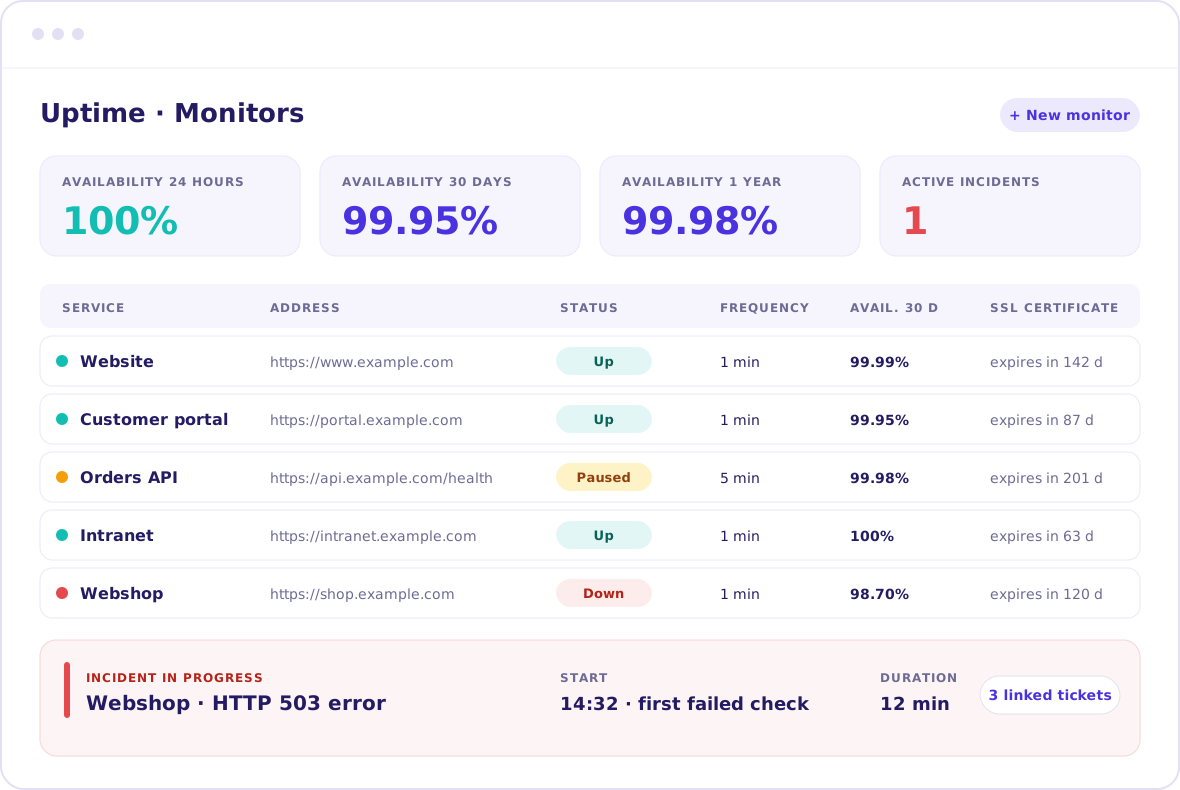
Uptime monitoring dashboard with the monitor list, availability and an incident in progress

Clients that trusted us

Vargroup logoEni Plenitude logoMonrif logoZenita Group logoUniversità Ca'Foscari logo

Don’t find out about downtime only from user reports

Uptime spots downtime in your services early and keeps the details needed to reconstruct the event: when it started, how long it lasted and what caused it.

Everything Uptime needs,
in one place

Checks and thresholds

HTTP/HTTPS checks at regular intervals

Choose how often to check, which responses mean a service is healthy and how many failed checks confirm an incident. That way you ignore brief slowdowns.

Minimum check interval: 1 minute

Configurable expected responses

Consecutive error threshold

Fewer false alarms
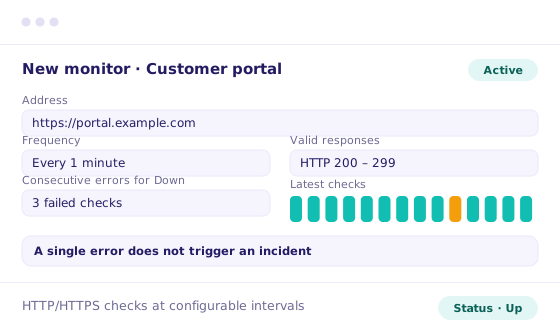
Uptime monitoring setup of a monitor with check frequency and error threshold

History and availability

Every minute of downtime is recorded

Every incident has a start, end, duration and cause. Availability is calculated over 24 hours, 30 days and one year: you check SLAs against real data, not estimates.

Start, end, duration and cause

Duration updated in real time

Availability (uptime) 24 h, 30 d, 1 year

Verifiable SLAs
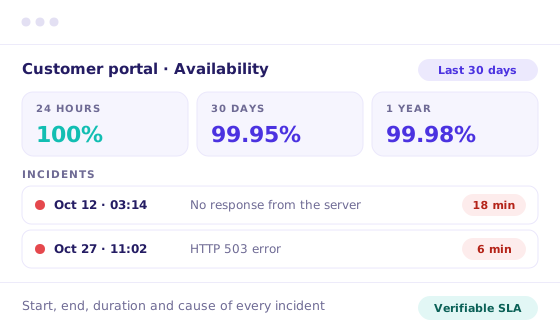
Availability over 24 hours, 30 days and one year with downtime history

Maintenance

Planned maintenance doesn’t skew the numbers

Schedule maintenance windows: checks are suspended and that period is excluded from availability. You can also pause a single monitor, for example during a migration.

Maintenance windows

Pause per monitor

Availability unaffected

Checks suspended
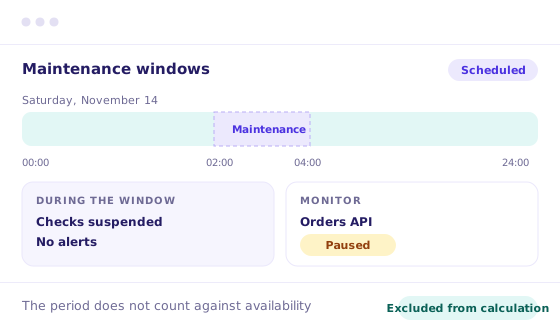
Scheduled maintenance window in Uptime monitoring

Tickets and Flow

One incident, all linked tickets

Link tickets to the incident that caused them and go from the ticket to the affected service. With Flow you can open a ticket or notify a manager when a service goes Down.

Tickets linked to the incident

Service visible from the ticket

Automations with Flow

One incident to manage
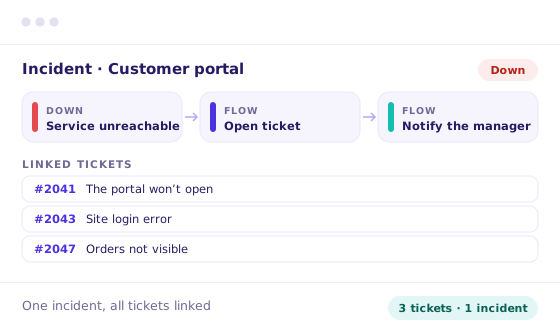
Incident linked to tickets with automatic Flow actions

Status for customers

Customers check their services’ status on their own

Customers see the status and availability of their services from the User Portal, without calling support. You choose what to show and to whom. MSPs manage multiple customers from a single instance.

Status in the User Portal

Visibility by group

Multiple customers, separate data

More transparency
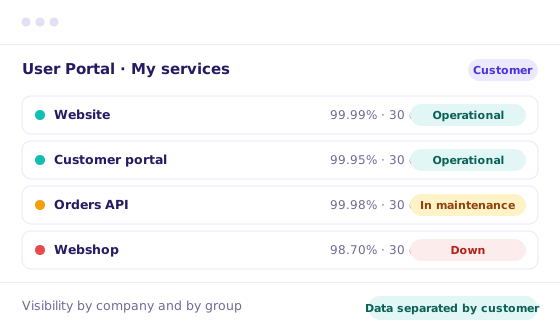
Service status visible to customers in the User Portal
Try the free demo

Discover the full platform, no commitment

Uptime in detail

CERTIFICATES

SSL/TLS expiry under control

For HTTPS services, Uptime detects and stores the SSL/TLS certificate expiry date on the monitor, so you can plan the renewal ahead.

INCIDENT LOG

Every incident, logged automatically

When the incident is confirmed, the status changes to Down and Deepser opens a record, which is closed on recovery. The start is the first failed check, not the confirmation.

SERVICE MANAGEMENT

Monitoring and tickets on the same platform

Uptime works alongside Ticket Management: fewer separate tools and a fuller view before and during an incident.

The Uptime module is included in the license:

Starter

Plus

Enterprise

Simple pricing plans that meet your needs

We offer different packages starting from three operator seats. Bigger teams unlock larger discounts.

Leave your email and see the prices
Per-operator prices, from a minimum of 3 operators. End users are always free.
Prices on screen right away — no call needed to see them. No spam.
Starter
To start out
/ operator
per month
🔒 Price hidden · min. 3 operators
View Price →
€ 40
/ operator
per month
Annual billing · min. 3 operators
Request a quote
✓
Ticketing system & ITIL compliant
✓
Dashboard & Report – Customizable
✓
CRM & Board Kanban
✓
SLA Management
✓
Calendar with Microsoft 365 & Google Calendar
✓
User Portal
✓
Task Management
✓
API – unlimited requests
+4 features
Show less
Best seller
Plus
For growing companies
/ operator
per month
🔒 Price hidden · min. 3 operators
View Price →
€ 55
/ operator
per month
Annual billing · min. 3 operators
Request a quote
✓
Everything in Starter
✓
CMDB – Unlimited Assets & Graph Views
✓
IT Asset Manager & IT Monitoring
✓
Contract Management
✓
Password Manager
✓
Knowledge Base
✓
Service Catalog
✓
Live Chat
+4 features
Show less
Enterprise
For larger companies
Custom
Based on modules and operators
Talk to us
✓
Everything in Plus
✓
AI Studio & Business Intelligence
✓
Workflows & NoCode/LowCode
✓
Project Management & Gantt View
✓
Approvals & Stages
✓
Sales & Invoicing
✓
Inventory & Warehouses
✓
Module Creator
✓
Customer Satisfaction & Surveys
+5 features
Show less

AI STUDIO

The engine, not an add-on
AI runs underneath every module — ticketing, workflows, reporting.
Full AI Studio & Business Intelligence included in Enterprise.
1
AI-powered customer support — triage and routing on arrival
2
AI supporting workflows — every step suggested, not hardcoded
3
Powerful task automation — repetitive work handled for you
Dedicated discounts for large groups
from 10 operators up the price drops
→
ask for your tier
View all features
Just want to try it?
Try free

Get more value from the tools you already use

Connect Deepser to your existing technology stack and expand the platform’s capabilities without replacing what already works.

Deepser LDAP integration
Deepser CTI integration
Deepser integration with NinjaOne
Deepser integration with Datto
Deepser integration with TeamViewer
Deepser integration with AnyDesk
Deepser integration with Microsoft Teams
Deepser integration with Google Calendar
Deepser integration with Splashtop
Deepser integration with Supremo
Deepser integration with Baramundi
Deepser custom modules
Deepser API and webhooks integration
Deepser Customer Portal
Deepser email integration
Deepser integration with ISL Online
Deepser integration with Microsoft Entra ID
Deepser integration with Outlook Calendar
Deepser integration with Mailchimp
Deepser integration with Microsoft Intune
Deepser integration with 3CX
Deepser integration with Digital Ocean
Deepser integration with ManageEngine OpManager
Deepser data import
Deepser Deep Chat
See all integrations

What Deepser offers

Low-code platform

Allows you to configure and customize processes quickly, ensuring autonomy even without technical development.

Intelligent Workflows

Support activities in real time by analyzing data and updates to trigger decisions within workflows.

Multi-LLM

Combines different language models to deliver effective responses based on diverse operational needs.

Verified on security, awarded on support

Every day we handle sensitive data, credentials, access and company information. Protecting it doesn't rely only on internal procedures, but on certified standards.

ISO 27001 certification icon

ISO 27001

ISO 9001 certification icon

ISO 9001

GDPR compliance badge

GDPR

Software Advice Most Recommended 2026 badge

MOST RECOMMENDED

Capterra badge with a 4.6 out of 5 rating

4.6 ON CAPTERRA

Discover more about our certifications →

Frequently asked questions about Uptime

Uptime is the Deepser module that automatically checks the availability of websites, portals, applications and APIs. It runs regular checks, logs incidents, measures how long they last and links them to tickets.

Checks run over HTTP or HTTPS at a configurable frequency, with a minimum interval of one minute. For each monitor you also define how many consecutive checks must fail before the incident is confirmed.

Uptime calculates availability over three periods: 24 hours, 30 days and one year. Planned maintenance windows are excluded, so the figures reflect real downtime.

Yes. From the User Portal customers see the status and availability of their services without contacting support. You choose which monitors to show and to which user groups, based on company associations and permissions.

Yes. A Managed Service Provider can monitor the services of multiple customers from a single Deepser instance, keeping each customer’s data separate.

Uptime is included in the Deepser Plus license. If you are already a customer, contact support to activate it. If not, request a demo from the sales team.

Now that you know Deepser,
start transforming your company.

Access the recording

See Deepser in action

Work with us

Access the Resource

Complete the form to get immediate access.

Compare all features
Feature
Starter
Plus
Enterprise
Service & Ticketing
Service Management
Incident Management
Issue Management
Request Management
Problem Management
Change Management
Customizable Service Types
Help Desk
Manage Priority/Urgency
Manage Status
Multi-Level Customizable Categorization
Routing Rules
Request Assignment
Customizable Service Desk Queues
Reminders
Escalation Rules
Multichannel Communication
Email Ticketing
Unlimited Email Integrations
Automatic Email Notifications
Customizable Email Templates
Call Center Management
CTI Integration
Time Tracking
Worklog Activities & Reports
Internal Comments
Comments To Users
Pre-Defined Quick Replies And Macros/Templated Responses
Ticket Relationship Mapping
Custom Ticket Templates
Multiple Ticket Templates & Template Rules
Ticket Export
Task Automation
To Do List
Tasks For Maintenance Scheduling And Activity Planning
Visual Calendar And Progress
Split Activities To Multiple Users
Customizable Task Types
Customizable Task Templates And Fields
SLA
Multiple Service Level Agreements Policies
Custom Work Calendars
Custom Unlimited Metrics
Custom Unlimited Goals
Business Rules Management
Reminders And Notifications
Escalations For Sla Violation
Escalations To Prevent Sla Violation
Marketing
Conversions Management
Ads Campaigns Management
UTM Parameteres Tracking
Performance Monitoring
Advanced Collaboration
Changes Tracking
Sales
Catalog: Product Management
Catalog: Simple Products & Grouped Products
Catalog: Product Types and Visibility
Catalog: Related Products
Tax Management
Tax based on Country
Multiple taxes
Currency: Multiple Currency
Currency: Automatic Currency Rate Updates
Currency: Quotes & Orders with different currencies
Price List: Multiple Price List Management
Price List: Catalog Price List Rules & Priorities
Price Lists based on Account
Quotation Management
Quotation templates
Order Management
Order templates
Create Orders from Quotations
Invoice Management
Invoice templates
Create Invoice from Orders
Create Invoice from Tickets
Create Invoice from Products
Shipment Management
Shipment templates
Create Shipment from Orders
Calendar
Visual Calendars
Customizable Calendars Linked To Service, Cmdb, Crm, Tasks, Etc.
Integration with Microsoft 365 & Google Calendars
ITAM
IT Asset Manager With Auto-Discovery
Asset Lifecycle Management
Job Rules To Automatically Assign Assets To Companies/Users
Remote Collectors For Segregated Networks
Windows Agent
Agentless Discovery With Multiple Protocols
Monitoring
Software Manager: Auto-Detect Of Installed Software
Ip Address Manager With Subnets Auto-Discovery
Remote Control With Teamviewer
Remote Control With Anydesk
Remote Control With Splashtop
Integrations
Unlimited Ldap Integrations
LDAP Compliance With All Commercial Standards (Active Directory, Open Ldap, Etc.)
Import Users From LDAP
Import Groups From LDAP
Azure AD
SAML & OAuth2.0
SSO – Single Sign On
SSO Linked With Ldap Integration
Import – Powerful Native Tool
Import – Unlimited Customizable Imports
Export – Excel/Csv/Pdf Exports
Integration – Connector For External Integrations
API – Powerful Rest API
Open Source Library For Api Integration
Telephone Switchboards Via CTI
Dashboard
Real Time Html5 Dashboards
Dashboards Panels With Group Permissions
Unlimited Customizable Dashboards
Reports
Pre-Defined Reports
Unlimited Customizable Reports
Scheduled Email Reports
Grids
Massive Actions For Multiple Updates
Excel/Csv Export
Granular Visibility Permissions
Miscellaneous
Watchers Users
Multicompany
Multidepartment
Supervisor Users
Global Search On All Entities
Unlimited Custom Fields
Customizable Branding
Custom Fields For Every Entity: Ticket, Crm, Cmdb, Users, Companies, Itam, Etc.
Customizable Form Templates
Granular Visibility For Every Template Field
Customizable Template Rules
Custom Grids
Custom Grids: Easy Configuration With Drag&Drop Tool
Custom Events For Integrations Or Custom Processes
Multifactor Authentication
Multi Language
Flexible And Powerful Permission Management
Flexible User Groups
Customizable User Roles
System Lists With Advanced Permissions And Logic
Unlimited Customizable Lists With Advanced Permissions And Logic
Attachments For Document Storage
Unlimited Attachments With Drag&Drop Management
Attachment Types With Advanced Permissions For Visibility
Multiple Warehouse Management
Warehouse Loads and Unload
Warehouse: Tickets and Worklog integration
Portals
End User Portal
Self-Service Portal
User Registration With Customizable Signup Process
Guest Portal For Non-Registered Users
Cmdb Portal For End Users / Customers
Crm Portal For End Users/Customers
Cms For Guest Portal
Announcement: Type management
Announcement: ITSM Release Management
Announcement: Scheduling
Announcement: Visibility management & permissions
Announcement: Tag categorization and custom sorting
Announcement: Integration with Portal Designer
Chat
Internal Conversations
Internal Conversation Channels
End User Portal Chat
Conversation Channels With Multiple End Users / Customers
Web Widget
Branded Widget Published On Multiple Web Sites
Customization Of The Widget
Customizable Offline Module
Unlimited Simultaneous Chats
File Sending
Activity Hours
Board
Kanban With Entities Integration
Kanban With Free Forms
Contract
Integrated Worklogs
Purchase Orders Management
Suppliers Management
Contracts In Hours & Quantity
Contracts Workflows
CRM
Account Management (Customers, Providers, Suppliers, Partners, Etc.)
Contact Management (Leads, Prospects, Contacts, Etc.)
Opportunity Management
Customizable Opportunity Types
Linked With Service Management And Contracts
Sales Pipeline Management
Email Crm For Sales Opportunities And Contracts
Address management: Address type management (e.g. location address, billing, shipping, etc.)
Address management: Address association to Accounts, Offices, Warehouses and CMDB
Password Manager
Secure Password Manager With Double Key Encryption
Secure Password Manager Portal For End Users / Customers
Secure Password Manager With Corporate (Shared) Passwords
Secure Password Manager With Private Passwords
Audit Log For Passwords Security
Passwords Linked To All Entities Of The System
Password Manager: Automatic Generation
Password Manager: Strength Checker
Knowledge Base
Multiple Knowledge Bases
Kbs Visibility Based On Groups
Portal Kbs For End Users / Customers
Public Kbs For Non-Logged Users
Kb Linked To Tickets
Kb Linked To Cmdb / Itam
Kb Linked To Crm
CMDB
Unlimited Customizable Ci Object Types
Unlimited Cis
Relations Between Cis
Link With Tickets
Link With Crm And Contracts
Service Catalog Management
Contract Management
License Management
Locations
Link With Itam (Autodiscovery) Module
Planned Activities / Maintenance
Email Cmdb For Devices And Contracts
Graph view relations
Graph view layout & dynamic loading
Module Creator
Create Apps & Custom Modules
Create Custom Forms & Grids
Create End User Portal Custom Modules
Create Custom API
Survey
Customer Satisfaction Survey
Survey Form Visual Designer
Automatic Surveys
Realtime Dashboards
Periodic surveys
Project
Project Management
Auto-scheduling for tasks
Advanced Permissions
Project dependencies and constraints
Project milestones and deliverables
Flow
Approval Request Management
Management Of Approvals By Email
Management Of Approvals From User Portal
Approval Rules Management
Approval Stage Management
Management Of Scheduled Flows
Management Of Automatic Entity Creation
Management Of Automatic Entity Update
Scheduled Maintenance Management
Task Automation Management
Automatic Email Management
No Code / Low Code Platform
Portal Designer
Visual Portal Designer
Frontend Portal Visual Designer
Graphic Widget
Portal Page Management
Group Based Visibility Management
Graphic Widget Customization
Multiple Portals Management
Product Management
Development Task Prioritization
Bug and Fix Tracking
Product Issue Management
Product Backlog Management
Feature Requests Management
Changes Tracking
Task Assignment to Developers