


In today’s fast-paced business world, finding ways to reduce costs is crucial for maintaining a competitive edge. One powerful tool that can help achieve significant cost savings is Customer Relationship Management (CRM) software.
By automating routine tasks, reducing administrative burdens, and improving workflow efficiency, CRM systems can lead to substantial cost reductions. Additionally, these systems enable businesses to identify high-value customers, personalize marketing efforts, and enhance customer service, ultimately boosting customer satisfaction and retention.
Let’s dive into how CRM software can transform your business and help cut costs.
AUTOMATING ROUTINE TASKS
CRM software excels at automating routine tasks that would otherwise consume valuable time and resources. For instance, data entry, scheduling appointments, and sending follow-up emails can all be automated using CRM systems. By handling these tasks automatically, businesses can free up their employees to focus on more strategic activities, leading to higher productivity and cost savings.
EXAMPLES OF AUTOMATED TASKS
- Data Entry: Instead of manually entering customer information, CRM software can automatically capture and update data from various sources.
- Appointment Scheduling: Automated reminders and scheduling features ensure that important meetings are never missed.
- Follow-Up Emails: Pre-set email templates and automated triggers can send timely follow-up emails to customers, enhancing engagement without additional effort.
By automating these tasks, we can reduce the need for manual intervention, saving time and reducing the risk of human error.
REDUCING ADMINISTRATIVE BURDNES
Administrative tasks can be a significant drain on resources. CRM software helps to minimize these burdens by streamlining processes and centralizing information. With all customer data in one place, employees can easily access the information they need without wasting time searching through multiple systems or databases.
CENTRALIZED INFORMATION
Having a centralized repository of customer information means that everyone in the organization has access to up-to-date data. This not only improves efficiency but also ensures that all team members are on the same page when interacting with customers.
- Unified Customer Profiles: CRM software consolidates customer interactions, purchase history, and preferences into a single profile, providing a comprehensive view of each customer.
- Real-Time Updates: Changes and updates to customer information are reflected in real-time, ensuring that everyone has access to the latest data.
IMPROVING WORKFLOW EFFICIENCY
Efficient workflows are essential for reducing costs and improving overall business performance. It enhances workflow efficiency by providing tools and features that streamline operations and facilitate collaboration among team members.
CRM SOFTWARE WORKFLOW AUTOMATION
Automating workflows ensures that tasks are completed promptly and consistently. IT can set up automated workflows that guide employees through standard procedures, reducing the likelihood of errors and delays.
- Task Assignment: CRM systems can automatically assign tasks to the appropriate team members based on predefined criteria, ensuring that work is distributed evenly and efficiently.
- Progress Tracking: Automated workflows enable managers to track the progress of tasks in real-time, allowing them to identify and address bottlenecks promptly.
USING CRM DATA TO IDENTIFY HIGH-VALUE CUSTOMERS
Understanding which customers are the most valuable to your business is key to maximizing profits and reducing costs. CRM software provides valuable insights into customer behavior and preferences, enabling businesses to identify and focus on high-value customers.
ANALYZING CUSTOMER DATA
By analyzing customer data, businesses can identify patterns and trends that indicate high-value customers. CRM software provides powerful analytics tools that make it easy to segment customers based on various criteria, such as purchase history, frequency of interactions, and overall engagement.
- Customer Segmentation: Segmenting customers into different groups based on their behavior and preferences allows businesses to tailor their marketing efforts more effectively.
- Predictive Analytics: CRM systems can use predictive analytics to forecast future customer behavior, helping businesses anticipate needs and proactively address them.
CRM SOFTWARE FOR PERSONALIZED MARKETING EFFORTS
Personalized marketing is more effective than generic campaigns, leading to higher conversion rates and customer satisfaction. CRM software enables businesses to create personalized marketing campaigns that resonate with individual customers.
CUSTOMIZING MARKETING MESSAGES WITH A CRM SOFTWARE
With access to detailed customer profiles, businesses can craft personalized marketing messages that address specific needs and preferences. This level of customization increases the likelihood of engagement and conversion.
- Targeted Campaigns: CRM software allows businesses to create targeted marketing campaigns that reach the right audience with the right message.
- Dynamic Content: Personalized content, such as tailored product recommendations and special offers, can be delivered to customers based on their behavior and preferences.
RETAINING CUSTOMERS TO REDUCE COSTS
Acquiring new customers is more expensive than retaining existing ones. CRM software helps businesses improve customer retention by fostering stronger relationships and providing exceptional customer service.
ENHANCING CUSTOMER ENGAGEMENT WITH A CRM SOFTWARE
Engaged customers are more likely to remain loyal and continue doing business with you. CRM software provides tools that help businesses stay connected with their customers and keep them engaged.
- Loyalty Programs: CRM systems can manage loyalty programs that reward customers for their continued business, encouraging repeat purchases and long-term loyalty.
- Customer Feedback: Collecting and analyzing customer feedback helps businesses understand their customers’ needs and preferences, allowing them to make improvements that enhance satisfaction.
CRM SOFTWARE TO ENHANCE CUSTOMER SERVICE
Exceptional customer service is critical for maintaining customer satisfaction and retention. CRM software enhances customer service by providing comprehensive customer information that enables quicker issue resolution and reduced support costs.
COMPREHENSIVE CUSTOMER INFORMATION
Having access to complete and up-to-date customer information empowers support teams to provide better service. CRM software consolidates customer interactions, purchase history, and preferences into a single profile, making it easy for support agents to understand and address customer issues.
- 360-Degree View: A holistic view of the customer ensures that support agents have all the information they need to provide personalized and efficient service.
- Interaction History: Access to past interactions allows support agents to understand the context of the customer’s issue and provide more effective solutions.
REDUCE SUPPORT COSTS
Efficient customer service processes help reduce support costs by minimizing the time and resources required to resolve issues. CRM software streamlines support workflows and automates routine tasks, leading to faster issue resolution and lower costs.
STREAMLINING SUPPORT WORKFLOWS WITH A CRM SOFTWARE
CRM systems provide tools that streamline support workflows, ensuring that issues are addressed promptly and efficiently.
- Ticketing System: CRM software often includes a ticketing system that organizes and prioritizes customer support requests, ensuring that they are addressed promptly.
- Automated Responses: Automated responses can handle common customer inquiries, freeing up support agents to focus on more complex issues.
IMPROVING CUSTOMER SATISFACTION
Satisfied customers are more likely to remain loyal and recommend your business to others. CRM software helps improve customer satisfaction by providing the tools needed to deliver exceptional service and personalized experiences.
PERSONALIZED CUSTOMER INTERACTIONS WITH A CRM SOFTWARE
Personalized interactions make customers feel valued and understood. CRM software enables businesses to provide tailored experiences that meet individual customer needs.
- Personalized Recommendations: Using customer data, CRM systems can generate personalized product recommendations that match the customer’s preferences.
- Tailored Communication: Personalized communication, such as birthday messages and special offers, helps build stronger relationships with customers.
INCREASING CUSTOMER RETENTION
Customer retention is essential for reducing costs associated with customer churn and acquisition. CRM software helps businesses retain customers by enhancing engagement, improving service, and providing valuable insights.
PROACTIVE ENGAGEMENT
Proactive engagement helps businesses stay connected with their customers and address potential issues before they escalate.
- Regular Check-Ins: CRM systems can schedule regular check-ins with customers to ensure that they are satisfied and address any concerns.
- Customer Insights: Analyzing customer data helps businesses identify potential churn risks and take proactive measures to retain those customers.
CONCLUSION
CRM software is a powerful tool that can help businesses achieve significant cost reductions by automating routine tasks, reducing administrative burdens, and improving workflow efficiency. By using CRM data to identify high-value customers, personalize marketing efforts, and enhance customer service, businesses can boost customer satisfaction and retention, ultimately leading to lower costs associated with customer churn and acquisition.
If you’re looking to reduce costs and improve your business performance, consider investing in a CRM system. The benefits of CRM software extend far beyond cost savings, offering valuable insights and tools that can transform your business.
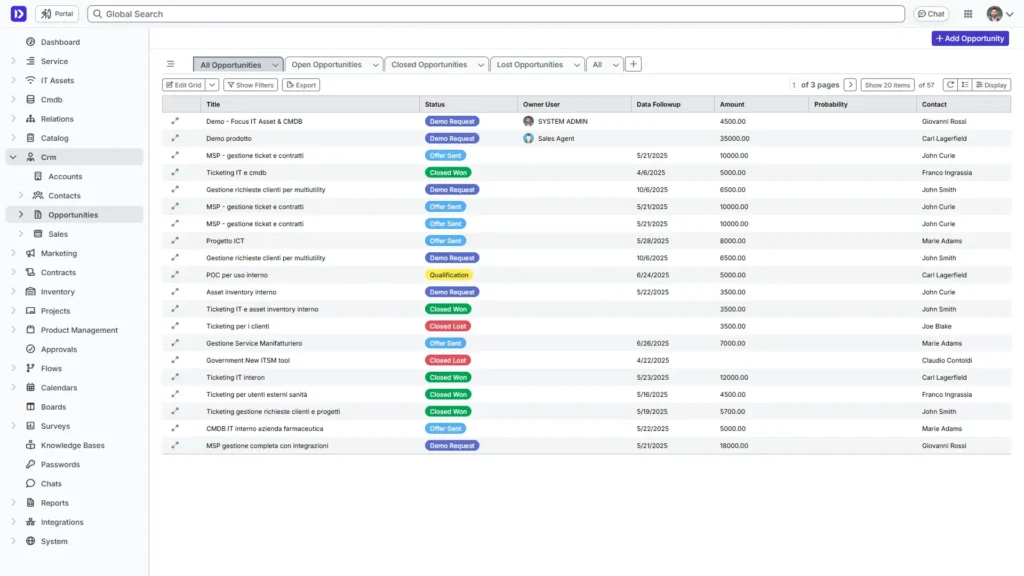
Ready to see how CRM software can benefit your business? Request a demo today and discover the power of CRM for yourself!



