Opens in a new tab
Back
Back
Back
News

›

New Deepser cloud integrations for an always up-to-date IT inventory

In this article

New Deepser cloud integrations for an always up-to-date IT inventory

November 10, 2026

·

6 min read

Tuany Troleze

Tuany Troleze

Nuove integrazioni cloud Deepser

Managing an IT infrastructure spread across different cloud environments and on-premises systems often means having to check multiple platforms to get information about company assets. Even a simple check can take time when data is scattered across separate consoles, making it harder to get a complete view of the infrastructure.

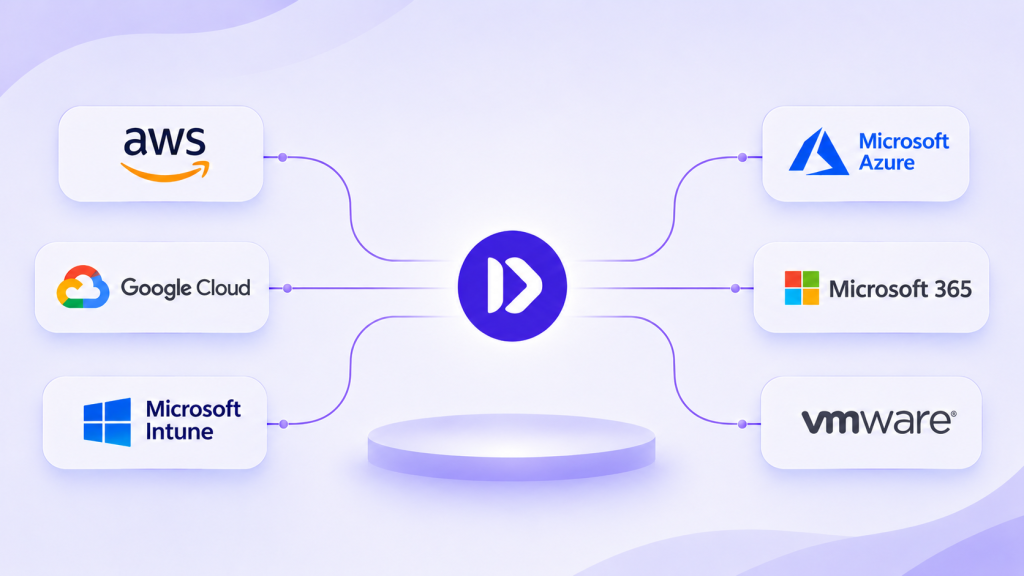
To simplify these activities, Deepser introduces new integrations with AWS, Microsoft Azure, Google Cloud, Microsoft 365, Microsoft Intune and VMware, making it possible to collect infrastructure information into a single inventory, kept up to date through periodic syncs.

The new connectors expand the platform’s capabilities and make IT asset data available directly within Service Management processes.

A single inventory for every IT environment

Modern infrastructures often include assets spread across multiple cloud providers and corporate data centers. Having a complete view of these environments is essential to plan IT activities and keep the information needed for daily operations under control.

With Deepser‘s new integrations, data from the different systems is collected and organized in the platform. The information can be viewed through a centralized inventory and used in existing processes.

A single connection per environment makes it possible to collect information for the entire organization, including its various subscriptions and associated accounts.

Syncs run periodically and keep the inventory aligned with the information in the source systems. When new assets are added or existing ones are decommissioned, the changes are picked up during the next updates.

All integrations are read-only, with secure access and permissions limited to the information needed. Deepser reads the data without changing the configuration of the connected environments.

Which environments can you connect to Deepser?

The new integrations collect information specific to each environment and make it available inside the platform.

AWS, Microsoft Azure and Google Cloud

With Amazon Web Services (AWS), Deepser retrieves information about servers and load balancers. The inventory also includes digital certificates with their expiry dates, as well as domains and DNS records. Collection can extend to the entire AWS organization.

The Microsoft Azure integration lets you view subscriptions and the associated resources. These include virtual machines and networks, along with databases and storage systems. Information on the applications in the environment is also available.

For Google Cloud, data on projects and the associated resources is imported, including virtual machines and IP addresses. The integration also lets you view information on functions and IAM permissions.

This way, assets spread across different providers become available through a centralized inventory, useful also for infrastructure audits and capacity planning.

Microsoft 365 and Intune

The Microsoft integrations expand the information available to the Service Desk and to those who manage corporate environments.

With Microsoft 365, Deepser collects data on purchased licenses and on those actually used, broken down by type. This visibility makes it easier to spot unused licenses and supports renewal decisions.

Shared mailboxes and distribution lists can also be viewed. The inventory also includes SharePoint sites and shared company resources, such as meeting rooms and equipment.

A further capability concerns the applications registered in the Microsoft environment. Deepser can collect information on their client secrets and certificates, making periodic access reviews easier.

Microsoft Intune, on the other hand, lets you import information on corporate devices, linking them to users. For each device, the operating system and the main hardware specs are available, along with the compliance status and the category it belongs to.

This information can be linked directly to tickets, giving agents a more complete context while handling support requests.

VMware and on-premises infrastructure

The new integrations also include VMware, to collect information on physical servers and virtual machines in corporate data centers.

The connection to on-premises environments happens without exposing the infrastructure to the Internet or installing agents on individual machines.

The information is thus integrated into the same inventory that collects cloud assets, making access easier in hybrid environments too.

Deepser - IT inventory and cloud integrations

From infrastructure data to Service Management processes

Collecting information about IT assets is only the first step. The main benefit of the new integrations is the ability to use this data directly in the activities managed through Deepser.

The synced assets are available in the platform like the other inventory items. They can therefore be linked to tickets and used to configure reports or automations.

For example, when a user opens a support request, the agent can view the information of the associated device. The data imported from Intune makes it possible to check the operating system and the compliance status, reducing the need to access other consoles during resolution.

Another case concerns the digital certificates imported from AWS. The expiry dates can be used to configure proactive notifications or automatically open a ticket, helping the IT team act before an expired certificate causes a service outage.

The collected information also provides a basis for building Deepser‘s CMDB, by defining the classifications and the relationships between assets and business services.

The synced data is also ready to be used by Deepser‘s AI agents, expanding the possibilities for automating IT processes.

How to activate the new integrations

Activating the integrations happens with the support of the Deepser team, which guides customers in configuring the connections and verifying the collected information.

The first step is to identify the environments to connect, assessing together with the IT team the integrations most useful for the organization.

Next, the necessary access is set up and the connections are configured. Once synchronization has started, you can check the first imported data and define how to use it within the platform.

Through Deepser Professional Services, you can also customize the update frequency and configure automations based on operational needs. The team also supports the creation of reports and dashboards dedicated to infrastructure monitoring.

The available services include CMDB modeling and the development of custom integrations, to tailor data collection to the characteristics of the company’s systems.

A more visible infrastructure, a more efficient IT

With the new cloud integrations, Deepser expands its inventory capabilities and makes it easier to access information coming from different environments.

Having the data available within the same platform helps IT teams reduce manual checks and find assets more quickly. The collected information also becomes usable in support processes and automations, helping make daily activities more efficient.

The new connectors join the integrations already available with NinjaOne, Datto RMM, Baramundi, ManageEngine OpManager, DigitalOcean and Fatture in Cloud, further expanding the connection options with the tools organizations use.

Availability

The new integrations with AWS, Microsoft Azure, Google Cloud, Microsoft 365, Microsoft Intune and VMware are available in Deepser.

To learn about activation and discover how to connect your IT environments, contact our team. We will help you identify the most suitable integrations and set up data collection based on your organization’s needs.


Subscribe to our newsletter

Get the best content on ITSM software, customer service and processes in your inbox twice a month.

Summarize this article with AI

Access the recording

See Deepser in action

Work with us

Access the Resource

Complete the form to get immediate access.

Compare all features
Feature
Starter
Plus
Enterprise
Service & Ticketing
Service Management
Incident Management
Issue Management
Request Management
Problem Management
Change Management
Customizable Service Types
Help Desk
Manage Priority/Urgency
Manage Status
Multi-Level Customizable Categorization
Routing Rules
Request Assignment
Customizable Service Desk Queues
Reminders
Escalation Rules
Multichannel Communication
Email Ticketing
Unlimited Email Integrations
Automatic Email Notifications
Customizable Email Templates
Call Center Management
CTI Integration
Time Tracking
Worklog Activities & Reports
Internal Comments
Comments To Users
Pre-Defined Quick Replies And Macros/Templated Responses
Ticket Relationship Mapping
Custom Ticket Templates
Multiple Ticket Templates & Template Rules
Ticket Export
Task Automation
To Do List
Tasks For Maintenance Scheduling And Activity Planning
Visual Calendar And Progress
Split Activities To Multiple Users
Customizable Task Types
Customizable Task Templates And Fields
SLA
Multiple Service Level Agreements Policies
Custom Work Calendars
Custom Unlimited Metrics
Custom Unlimited Goals
Business Rules Management
Reminders And Notifications
Escalations For Sla Violation
Escalations To Prevent Sla Violation
Marketing
Conversions Management
Ads Campaigns Management
UTM Parameteres Tracking
Performance Monitoring
Advanced Collaboration
Changes Tracking
Sales
Catalog: Product Management
Catalog: Simple Products & Grouped Products
Catalog: Product Types and Visibility
Catalog: Related Products
Tax Management
Tax based on Country
Multiple taxes
Currency: Multiple Currency
Currency: Automatic Currency Rate Updates
Currency: Quotes & Orders with different currencies
Price List: Multiple Price List Management
Price List: Catalog Price List Rules & Priorities
Price Lists based on Account
Quotation Management
Quotation templates
Order Management
Order templates
Create Orders from Quotations
Invoice Management
Invoice templates
Create Invoice from Orders
Create Invoice from Tickets
Create Invoice from Products
Shipment Management
Shipment templates
Create Shipment from Orders
Calendar
Visual Calendars
Customizable Calendars Linked To Service, Cmdb, Crm, Tasks, Etc.
Integration with Microsoft 365 & Google Calendars
ITAM
IT Asset Manager With Auto-Discovery
Asset Lifecycle Management
Job Rules To Automatically Assign Assets To Companies/Users
Remote Collectors For Segregated Networks
Windows Agent
Agentless Discovery With Multiple Protocols
Monitoring
Software Manager: Auto-Detect Of Installed Software
Ip Address Manager With Subnets Auto-Discovery
Remote Control With Teamviewer
Remote Control With Anydesk
Remote Control With Splashtop
Integrations
Unlimited Ldap Integrations
LDAP Compliance With All Commercial Standards (Active Directory, Open Ldap, Etc.)
Import Users From LDAP
Import Groups From LDAP
Azure AD
SAML & OAuth2.0
SSO – Single Sign On
SSO Linked With Ldap Integration
Import – Powerful Native Tool
Import – Unlimited Customizable Imports
Export – Excel/Csv/Pdf Exports
Integration – Connector For External Integrations
API – Powerful Rest API
Open Source Library For Api Integration
Telephone Switchboards Via CTI
Dashboard
Real Time Html5 Dashboards
Dashboards Panels With Group Permissions
Unlimited Customizable Dashboards
Reports
Pre-Defined Reports
Unlimited Customizable Reports
Scheduled Email Reports
Business Intelligence (BI)
Grids
Massive Actions For Multiple Updates
Excel/Csv Export
Granular Visibility Permissions
Miscellaneous
Watchers Users
Multicompany
Multidepartment
Supervisor Users
Global Search On All Entities
Unlimited Custom Fields
Customizable Branding
Custom Fields For Every Entity: Ticket, Crm, Cmdb, Users, Companies, Itam, Etc.
Customizable Form Templates
Granular Visibility For Every Template Field
Customizable Template Rules
Custom Grids
Custom Grids: Easy Configuration With Drag&Drop Tool
Custom Events For Integrations Or Custom Processes
Multifactor Authentication
Multi Language
Flexible And Powerful Permission Management
Flexible User Groups
Customizable User Roles
System Lists With Advanced Permissions And Logic
Unlimited Customizable Lists With Advanced Permissions And Logic
Attachments For Document Storage
Unlimited Attachments With Drag&Drop Management
Attachment Types With Advanced Permissions For Visibility
Multiple Warehouse Management
Warehouse Loads and Unload
Warehouse: Tickets and Worklog integration
Portals
End User Portal
Self-Service Portal
User Registration With Customizable Signup Process
Guest Portal For Non-Registered Users
Cmdb Portal For End Users / Customers
Crm Portal For End Users/Customers
Cms For Guest Portal
Announcement: Type management
Announcement: ITSM Release Management
Announcement: Scheduling
Announcement: Visibility management & permissions
Announcement: Tag categorization and custom sorting
Announcement: Integration with Portal Designer
Chat
Internal Conversations
Internal Conversation Channels
End User Portal Chat
Conversation Channels With Multiple End Users / Customers
Web Widget
Branded Widget Published On Multiple Web Sites
Customization Of The Widget
Customizable Offline Module
Unlimited Simultaneous Chats
File Sending
Activity Hours
Board
Kanban With Entities Integration
Kanban With Free Forms
Contract
Integrated Worklogs
Purchase Orders Management
Suppliers Management
Contracts In Hours & Quantity
Contracts Workflows
CRM
Account Management (Customers, Providers, Suppliers, Partners, Etc.)
Contact Management (Leads, Prospects, Contacts, Etc.)
Opportunity Management
Customizable Opportunity Types
Linked With Service Management And Contracts
Sales Pipeline Management
Email Crm For Sales Opportunities And Contracts
Address management: Address type management (e.g. location address, billing, shipping, etc.)
Address management: Address association to Accounts, Offices, Warehouses and CMDB
Password Manager
Secure Password Manager With Double Key Encryption
Secure Password Manager Portal For End Users / Customers
Secure Password Manager With Corporate (Shared) Passwords
Secure Password Manager With Private Passwords
Audit Log For Passwords Security
Passwords Linked To All Entities Of The System
Password Manager: Automatic Generation
Password Manager: Strength Checker
Knowledge Base
Multiple Knowledge Bases
Kbs Visibility Based On Groups
Portal Kbs For End Users / Customers
Public Kbs For Non-Logged Users
Kb Linked To Tickets
Kb Linked To Cmdb / Itam
Kb Linked To Crm
CMDB
Unlimited Customizable Ci Object Types
Unlimited Cis
Relations Between Cis
Link With Tickets
Link With Crm And Contracts
Service Catalog Management
Contract Management
License Management
Locations
Link With Itam (Autodiscovery) Module
Planned Activities / Maintenance
Email Cmdb For Devices And Contracts
Graph view relations
Graph view layout & dynamic loading
Module Creator
Create Apps & Custom Modules
Create Custom Forms & Grids
Create End User Portal Custom Modules
Create Custom API
Survey
Customer Satisfaction Survey
Survey Form Visual Designer
Automatic Surveys
Realtime Dashboards
Periodic surveys
Project
Project Management
Auto-scheduling for tasks
Advanced Permissions
Project dependencies and constraints
Project milestones and deliverables
Flow
Approval Request Management
Management Of Approvals By Email
Management Of Approvals From User Portal
Approval Rules Management
Approval Stage Management
Management Of Scheduled Flows
Management Of Automatic Entity Creation
Management Of Automatic Entity Update
Scheduled Maintenance Management
Task Automation Management
Automatic Email Management
No Code / Low Code Platform
Portal Designer
Visual Portal Designer
Frontend Portal Visual Designer
Graphic Widget
Portal Page Management
Group Based Visibility Management
Graphic Widget Customization
Multiple Portals Management
Product Management
Development Task Prioritization
Bug and Fix Tracking
Product Issue Management
Product Backlog Management
Feature Requests Management
Changes Tracking
Task Assignment to Developers
AI Studio
AI Studio
Uptime
Uptime Monitoring
Service Catalog
Service Catalog