

Opens in a new tab
Back
Back
Back
Blog

›

Why do projects fail? The 5 main Project Management challenges according to the PMI

In this article

Why do projects fail? The 5 main Project Management challenges according to the PMI

November 5, 2026

·

5 min read

Tuany Troleze

Tuany Troleze

Perché i progetti falliscono: le sfide del Project Management secondo il PMI

Anyone who manages business projects knows the feeling of starting the day with a plan that looks solid and watching it fall apart within a few hours. All it takes is an email flagging a check that runs longer than expected, or a department asking for a last-minute change, and the carefully built balance begins to wobble. After all, sticking to a project’s initial plan is almost always harder than it seems.

This reality is captured by the Pulse of the Profession 2026, the annual report from the Project Management Institute (PMI), now in its sixteenth edition, which gathers the experience of professionals around the world. The picture that emerges is clear. 97% of professionals managed at least one complex project in the past year, while 31% of complex projects do not fully achieve the expected benefits.

The most encouraging figure, though, comes from those who manage to keep complexity under control. According to the PMI, these projects are five times more likely to succeed. The secret is not avoiding difficulties, but recognizing them in time and looking at the project as a whole, an approach the report calls systems thinking. Let’s look at the main challenges the research highlights and how to tackle them.

You might also be interested in:

IT Project Manager: the perfect balance between IT skills and business strategy
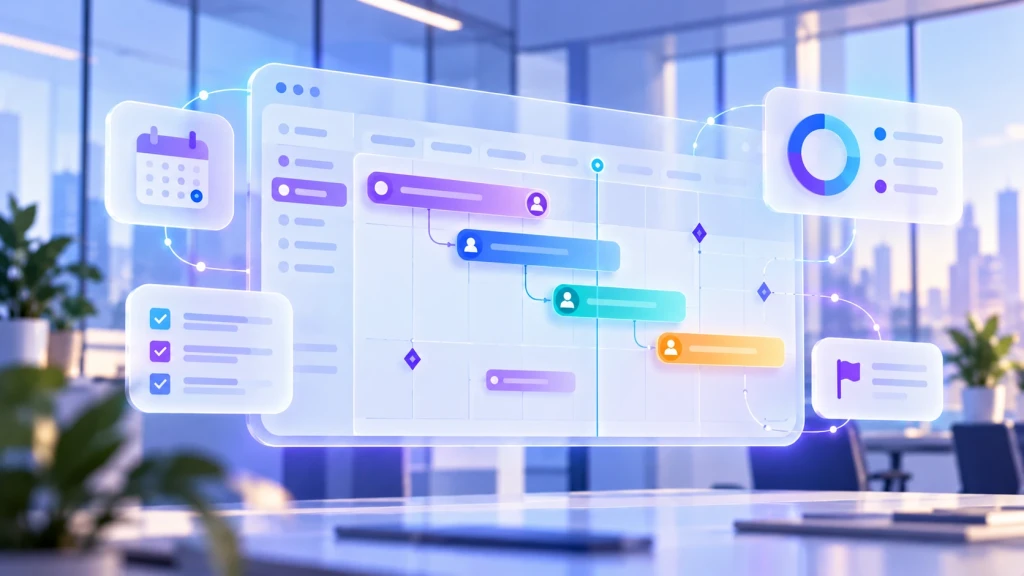
Gantt chart and dependencies between project activities

Challenge 1: Interdependencies turn a small delay into a big problem

The real difficulty is not the single delay, but the chain reaction it sets off. When activities depend on one another and involve several departments, a seemingly simple change is enough to shift the entire plan. The trouble is that these dependencies often stay invisible, and the Project Manager notices only once the delay has already hit other deadlines. It happens, for instance, when the release of a new software stays on hold waiting for another team’s checks while the following activities slip one after another.

Tackling this challenge means making the relationships between activities visible from the start. Having the dependencies in plain sight makes it possible to understand in advance which deliverables a delay would affect and to act before the problem spreads, instead of chasing it once it has already happened.

Challenge 2: Completing tasks does not mean generating value

The second challenge concerns how we measure success. Meeting deadlines matters, but completing tasks does not guarantee the expected results. As the project moves forward, priorities change and new needs arise, and whoever ignores them risks closing a project that only partly meets the company’s real needs.

The path the Pulse of the Profession 2026 points to is shifting the focus to the value actually generated, not just to completed tasks. In practice, tracking progress should go hand in hand with a constant check on business objectives, especially in long projects, where what was needed at the start may no longer be what is needed at the end.

Challenge 3: Poor visibility into real progress

The third challenge is getting a reliable picture of progress when each department works with different tools. To find out whether a deliverable will be met, you often have to write directly to the person in charge, because the available data does not really show where the work stands. Repeated across dozens of activities, this chase eats into the very time meant for managing the project.

The solution is to centralize information in a single system. With a tool like the Gantt chart, activities can be read along a timeline and dependencies become clear, so when a deadline moves it is immediate to see which other deliverables will be affected.

Challenge 4: A resource allocation that doesn’t hold up in practice

This challenge is about people more than tasks. A project can slow down even with a correct plan, if the people working on it are busy in parallel on other initiatives. Without a view of the commitments already made, the Project Manager plans around an availability that, in practice, does not exist, and finds out when the deadline is already at risk.

To get past it, you need to monitor workloads and correct imbalances before they hit the deadlines. Seeing how activities are distributed makes it possible to reorganize assignments when needed, with the added benefit of easing the pressure on people and building a more realistic plan.

Challenge 5: Spotting problems when it’s too late

The last challenge is a matter of timing. Relying only on periodic meetings to understand how the work is going often leads to discovering problems too late, when an activity has been stuck for days and the room to recover has already shrunk.

The solution is to follow progress as the work unfolds, not only at fixed intervals. Automatic alerts flag when an activity needs attention without waiting for a manual check, so decisions are made on up-to-date information and the project stays under control even when priorities change.

Deepser supports teams along this path with its Project Management module, which brings activities and progress together in a single environment. Gantt charts make dependencies visible, while automatic alerts flag delays in time. Resource management tools, in addition, help keep workloads under control. Thanks to the integration with the Service module, projects connect to tickets and Change requests, with information always accessible to the teams involved. Discover how Deepser simplifies project management and lets your team work with more visibility. Request a free demo.

Try our free demo

Subscribe to our newsletter

Get the best content on ITSM software, customer service and processes in your inbox twice a month.

Summarize this article with AI

Access the recording

See Deepser in action

Work with us

Access the Resource

Complete the form to get immediate access.

Compare all features
Feature
Starter
Plus
Enterprise
Service & Ticketing
Service Management
Incident Management
Issue Management
Request Management
Problem Management
Change Management
Customizable Service Types
Help Desk
Manage Priority/Urgency
Manage Status
Multi-Level Customizable Categorization
Routing Rules
Request Assignment
Customizable Service Desk Queues
Reminders
Escalation Rules
Multichannel Communication
Email Ticketing
Unlimited Email Integrations
Automatic Email Notifications
Customizable Email Templates
Call Center Management
CTI Integration
Time Tracking
Worklog Activities & Reports
Internal Comments
Comments To Users
Pre-Defined Quick Replies And Macros/Templated Responses
Ticket Relationship Mapping
Custom Ticket Templates
Multiple Ticket Templates & Template Rules
Ticket Export
Task Automation
To Do List
Tasks For Maintenance Scheduling And Activity Planning
Visual Calendar And Progress
Split Activities To Multiple Users
Customizable Task Types
Customizable Task Templates And Fields
SLA
Multiple Service Level Agreements Policies
Custom Work Calendars
Custom Unlimited Metrics
Custom Unlimited Goals
Business Rules Management
Reminders And Notifications
Escalations For Sla Violation
Escalations To Prevent Sla Violation
Marketing
Conversions Management
Ads Campaigns Management
UTM Parameteres Tracking
Performance Monitoring
Advanced Collaboration
Changes Tracking
Sales
Catalog: Product Management
Catalog: Simple Products & Grouped Products
Catalog: Product Types and Visibility
Catalog: Related Products
Tax Management
Tax based on Country
Multiple taxes
Currency: Multiple Currency
Currency: Automatic Currency Rate Updates
Currency: Quotes & Orders with different currencies
Price List: Multiple Price List Management
Price List: Catalog Price List Rules & Priorities
Price Lists based on Account
Quotation Management
Quotation templates
Order Management
Order templates
Create Orders from Quotations
Invoice Management
Invoice templates
Create Invoice from Orders
Create Invoice from Tickets
Create Invoice from Products
Shipment Management
Shipment templates
Create Shipment from Orders
Calendar
Visual Calendars
Customizable Calendars Linked To Service, Cmdb, Crm, Tasks, Etc.
Integration with Microsoft 365 & Google Calendars
ITAM
IT Asset Manager With Auto-Discovery
Asset Lifecycle Management
Job Rules To Automatically Assign Assets To Companies/Users
Remote Collectors For Segregated Networks
Windows Agent
Agentless Discovery With Multiple Protocols
Monitoring
Software Manager: Auto-Detect Of Installed Software
Ip Address Manager With Subnets Auto-Discovery
Remote Control With Teamviewer
Remote Control With Anydesk
Remote Control With Splashtop
Integrations
Unlimited Ldap Integrations
LDAP Compliance With All Commercial Standards (Active Directory, Open Ldap, Etc.)
Import Users From LDAP
Import Groups From LDAP
Azure AD
SAML & OAuth2.0
SSO – Single Sign On
SSO Linked With Ldap Integration
Import – Powerful Native Tool
Import – Unlimited Customizable Imports
Export – Excel/Csv/Pdf Exports
Integration – Connector For External Integrations
API – Powerful Rest API
Open Source Library For Api Integration
Telephone Switchboards Via CTI
Dashboard
Real Time Html5 Dashboards
Dashboards Panels With Group Permissions
Unlimited Customizable Dashboards
Reports
Pre-Defined Reports
Unlimited Customizable Reports
Scheduled Email Reports
Grids
Massive Actions For Multiple Updates
Excel/Csv Export
Granular Visibility Permissions
Miscellaneous
Watchers Users
Multicompany
Multidepartment
Supervisor Users
Global Search On All Entities
Unlimited Custom Fields
Customizable Branding
Custom Fields For Every Entity: Ticket, Crm, Cmdb, Users, Companies, Itam, Etc.
Customizable Form Templates
Granular Visibility For Every Template Field
Customizable Template Rules
Custom Grids
Custom Grids: Easy Configuration With Drag&Drop Tool
Custom Events For Integrations Or Custom Processes
Multifactor Authentication
Multi Language
Flexible And Powerful Permission Management
Flexible User Groups
Customizable User Roles
System Lists With Advanced Permissions And Logic
Unlimited Customizable Lists With Advanced Permissions And Logic
Attachments For Document Storage
Unlimited Attachments With Drag&Drop Management
Attachment Types With Advanced Permissions For Visibility
Multiple Warehouse Management
Warehouse Loads and Unload
Warehouse: Tickets and Worklog integration
Portals
End User Portal
Self-Service Portal
User Registration With Customizable Signup Process
Guest Portal For Non-Registered Users
Cmdb Portal For End Users / Customers
Crm Portal For End Users/Customers
Cms For Guest Portal
Announcement: Type management
Announcement: ITSM Release Management
Announcement: Scheduling
Announcement: Visibility management & permissions
Announcement: Tag categorization and custom sorting
Announcement: Integration with Portal Designer
Chat
Internal Conversations
Internal Conversation Channels
End User Portal Chat
Conversation Channels With Multiple End Users / Customers
Web Widget
Branded Widget Published On Multiple Web Sites
Customization Of The Widget
Customizable Offline Module
Unlimited Simultaneous Chats
File Sending
Activity Hours
Board
Kanban With Entities Integration
Kanban With Free Forms
Contract
Integrated Worklogs
Purchase Orders Management
Suppliers Management
Contracts In Hours & Quantity
Contracts Workflows
CRM
Account Management (Customers, Providers, Suppliers, Partners, Etc.)
Contact Management (Leads, Prospects, Contacts, Etc.)
Opportunity Management
Customizable Opportunity Types
Linked With Service Management And Contracts
Sales Pipeline Management
Email Crm For Sales Opportunities And Contracts
Address management: Address type management (e.g. location address, billing, shipping, etc.)
Address management: Address association to Accounts, Offices, Warehouses and CMDB
Password Manager
Secure Password Manager With Double Key Encryption
Secure Password Manager Portal For End Users / Customers
Secure Password Manager With Corporate (Shared) Passwords
Secure Password Manager With Private Passwords
Audit Log For Passwords Security
Passwords Linked To All Entities Of The System
Password Manager: Automatic Generation
Password Manager: Strength Checker
Knowledge Base
Multiple Knowledge Bases
Kbs Visibility Based On Groups
Portal Kbs For End Users / Customers
Public Kbs For Non-Logged Users
Kb Linked To Tickets
Kb Linked To Cmdb / Itam
Kb Linked To Crm
CMDB
Unlimited Customizable Ci Object Types
Unlimited Cis
Relations Between Cis
Link With Tickets
Link With Crm And Contracts
Service Catalog Management
Contract Management
License Management
Locations
Link With Itam (Autodiscovery) Module
Planned Activities / Maintenance
Email Cmdb For Devices And Contracts
Graph view relations
Graph view layout & dynamic loading
Module Creator
Create Apps & Custom Modules
Create Custom Forms & Grids
Create End User Portal Custom Modules
Create Custom API
Survey
Customer Satisfaction Survey
Survey Form Visual Designer
Automatic Surveys
Realtime Dashboards
Periodic surveys
Project
Project Management
Auto-scheduling for tasks
Advanced Permissions
Project dependencies and constraints
Project milestones and deliverables
Flow
Approval Request Management
Management Of Approvals By Email
Management Of Approvals From User Portal
Approval Rules Management
Approval Stage Management
Management Of Scheduled Flows
Management Of Automatic Entity Creation
Management Of Automatic Entity Update
Scheduled Maintenance Management
Task Automation Management
Automatic Email Management
No Code / Low Code Platform
Portal Designer
Visual Portal Designer
Frontend Portal Visual Designer
Graphic Widget
Portal Page Management
Group Based Visibility Management
Graphic Widget Customization
Multiple Portals Management
Product Management
Development Task Prioritization
Bug and Fix Tracking
Product Issue Management
Product Backlog Management
Feature Requests Management
Changes Tracking
Task Assignment to Developers