


What is Knowledge Management?
Knowledge management is a strategic process aimed at identifying, acquiring, organizing, sharing and using internal knowledge to improve business efficiency.
Implementing efficient Knowledge Management solutions where time is precious and quick responses are essential becomes a top priority.
Many IT professionals, service desk managers, and business decision-makers face significant challenges on a daily basis related to information dispersion and the difficulty in finding reliable answers quickly.
Why is Knowledge Management important for your company?
In a company where a Knowledge Management process has not yet been implemented, information is often scattered among documents, sheets of paper, emails, shared folders, and in the tacit knowledge of individual employees.
This fragmentation hinders quick access to critical information, making it challenging for employees to find the right answers when they need them
In this scenario, implementing proper knowledge management is critical to create a centralized, easily searchable system, enabling service desk operators to quickly access the information they need.
Benefits
The benefits of implementing a Knowledge Management are many, let’s look at some of them together:
Among the advantages we find first of all the significant reduction in information search time.
With immediate access to information, operators can quickly identify and resolve problems, greatly reducing the mean time to resolution(MTTR). This improves the quality of service delivery, saving time and reducing costs.
Another crucial benefit is the consistency of responses provided to users. A centralized and well-structured Knowledge Base ensures that all employees and service desk operators have access to the same accurate, up-to-date, and standardized information. This uniformity eliminates discrepancies in the answers provided, reducing confusion and improving the overall quality and reliability of support. As a result, end-users gain greater confidence in the organization, fostering trust and enhancing the company’s professional image.
Knowledge management also facilitates the onboarding and ongoing training of employees. A well-structured Knowledge Base allows new employees to quickly acquire the needed skills and existing employees to continually update themselves on company procedures and best practices, increasing the overall effectiveness.
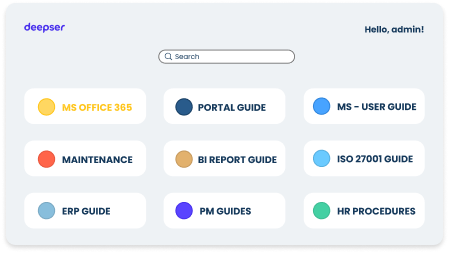
Finally, by implementing a user portal integrated with the Knowledge Base, customers can quickly find answers to their questions without needing to contact support.
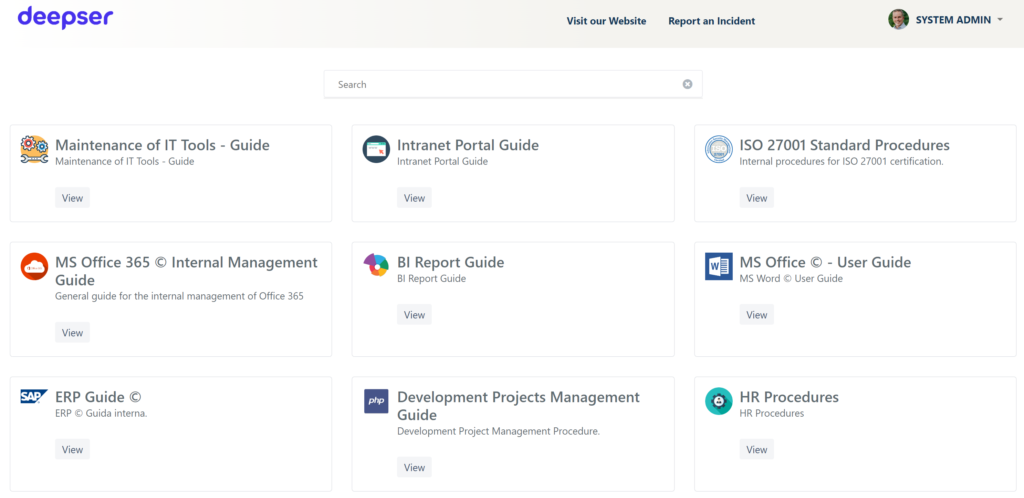
By providing instant access to solutions but also reduces the workload on support teams, allowing them to focus on more complex issues with greater added value, increasing productivity.
Characteristics of proper Knowledge Management
A well-organized Knowledge Base must feature a clear and intuitive structure, ensuring that users can quickly find the information they need. Articles should be logically categorized, using well-defined sections that group related topics together. Each article should have a concise and descriptive title, along with well-indexed content that incorporates relevant keywords to enhance searchability.
Using a centralized platform such as Deepser allows for a single, up-to-date repository.
Additionally, advanced search functionality, such as filters, tags, and AI-powered suggestions, can further streamline access to critical information, improving the overall user experience.
How to implement a Knowledge Management system
Let’s now explore the steps needed to effectively implement a knowledge management system:
1. Identification and information collection
The initial step involves reviewing all available business information to determine its relevance for both internal and external users. This information may include operational procedures, solutions to common issues, FAQs, technical documentation, user manuals, company best practices, and historical records of service tickets and requests.
This step is critical to avoid duplication and to properly structure content within the Knowledge Base.
A comprehensive evaluation will help differentiate outdated information that requires updates or removal from critical data that should remain readily accessible to all members of the organization.
2. Research and implementation of suitable software
After identifying the content to be managed, selecting a platform that enables the intuitive and efficient creation, organization, and access to the Knowledge Base is crucial. The software choice should consider the key factors mentioned earlier, along with the following:
- Access Control and Security: A robust Knowledge Management system must guarantee that information is accessible only to authorized users, safeguarding sensitive data and ensuring that each individual can view content relevant to their role. Granular access control is essential to maintaining strict oversight of shared information.
- Seamless Integration with Enterprise Tools: To enhance the efficiency of Knowledge Management, the Knowledge Base should integrate smoothly with other essential business systems, such as the Service desk, CRM, and ERP, ensuring a cohesive and streamlined workflow.
Deepser, for instance, provides an advanced Knowledge Base module that is seamlessly integrated with the Service Desk, enabling operators to quickly access solutions to common issues without leaving the platform. This reduces resolution time and enhances service quality. Additionally, Deepser is built for high flexibility and easy integration with external systems, including ERP solutions, collaboration tools like Microsoft Teams, and other enterprise software, thanks to its advanced API capabilities.
3. Employee training
Even the most advanced Knowledge Management software is ineffective if employees are not properly trained to use it. Therefore, it is essential to educate staff on how to search for information, update content, and actively contribute to the Knowledge Base.
To promote effective adoption, try the following strategies:
- Training sessions and webinars to show practical use cases.
- Internal guides and tutorials, available directly in the Knowledge Base.
- Awareness initiatives emphasizing the benefits of maintaining an up-to-date Knowledge Base, ensuring employees recognize the importance of their contributions and the impact on overall efficiency and company success.
4. Continuous updating
A well-maintained Knowledge Base must be continuously updated to keep information accurate, reliable, and relevant. To achieve this, it is essential to establish a structured strategy for regular updates, where:
- Service desk operators actively contribute by adding new solutions as they emerge.
- Each new issue handled by technicians that had not been previously documented becomes an opportunity to create a new article.
- Review workflows are implemented, in which older content is checked regularly for updates or to remove outdated information.
6. Monitoring and measurement
In order to evaluate the effectiveness of the Knowledge Base, it is essential to constantly monitor its use and the benefits it brings to the company. Some key KPIs to analyze include:
- Reduced mean time to resolution (MTTR): operators find the information they need to resolve tickets and problems faster.
- Decreased repetitive inquiries: end users independently find answers in the Knowledge Base, reducing the number of open tickets.
Deepser provides advanced analysis tools to monitor these parameters and continuously optimize enterprise knowledge management.
Knowledge manager: who is he and what is his role
The Knowledge Manager is responsible for ensuring the effective and strategic use of the Knowledge Base within the company, promoting information sharing and optimizing knowledge accessibility for all employees.
This role is not limited to the technical management of the Knowledge Base, but has a strategic function in enhancing the company’s information assets, improving productivity and operational efficiency.
The main responsibilities of a Knowledge Manager include:
- Structure and maintain the Knowledge Base to ensure information is easily accessible, logically categorized, and consistently updated.
- Establish and enforce best practices for content creation and updates, engaging various business teams in the process.
- Monitor Knowledge Base activity, analyzing access metrics, user feedback, and areas for improvement to enhance its effectiveness.
- Foster a knowledge-sharing culture, encouraging employees to contribute valuable insights and preserving corporate know-how.
- Work closely with the Service Desk and other departments to identify frequently requested information and ensure content aligns with users’ needs.
The Knowledge Manager is a hybrid role that blends technical, organizational, and strategic expertise. Their responsibilities are crucial in transforming corporate knowledge into a valuable asset rather than a barrier to productivity.
Conclusions
Effective knowledge management can radically transform your service desk, reducing resolution times, improving operational efficiency and increasing user satisfaction. With Deepser, you have an advanced Knowledge Base that is intuitive and seamlessly integrated with your IT ecosystem.
- Centralizes and organizes business information
- Reduces repetitive requests and speeds up ticket resolution
- Provides quick, standardized responses to your users
Try Deepser for free and start optimizing knowledge management in your company. Credit card not required!



