


Introduction
When an IT system goes down or a service becomes unavailable, every minute of downtime impacts the productivity and satisfaction of both customers and employees. These outages can result in direct financial losses, as well as less visible consequences like reputational damage or disruptions to other business processes.
To handle such situations effectively IT organizations track a key metric: Mean Time to Repair (MTTR). This indicator measures how quickly a team can restore a system or service to full functionality after a failure. Understanding your MTTR is the first step toward identifying bottlenecks, optimizing resource allocation, and meeting service level agreements.
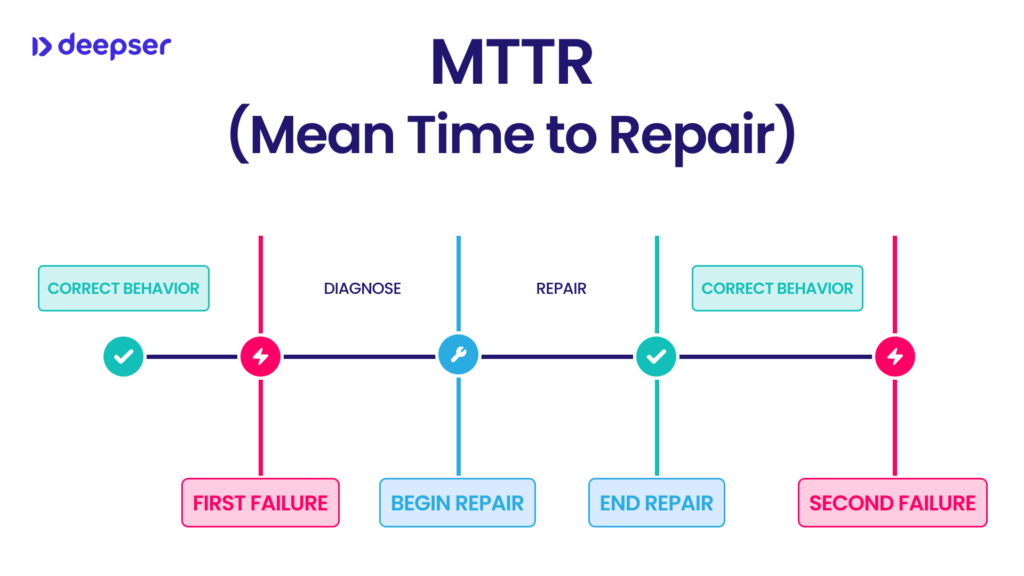
MTTR: what is it
MTTR, or Mean Time to Repair, represents the average time required to resolve an outage, from the moment a problem is detected to the full restoration of service. In essence, it measures how quickly an organization can respond to a failure and restore business continuity.
Rather than a single value, MTTR is an average calculated across multiple incidents. This provides an overall picture of the effectiveness of maintenance and technical support processes over time.
This metric is particularly important in environments where digital services must be available around the clock. The shorter the repair time, the lower the risk of disruption for end users. In today’s increasingly connected ecosystem, failing to monitor MTTR can mean losing control over costs, service level agreements, and overall performance.
Full meaning and definition
MTTR goes beyond simply replacing a failed component. It also encompasses diagnosis, root cause identification, technical intervention, and post-repair testing to ensure proper functionality.
One important clarification: MTTR does not include time spent on planned activities such as scheduled maintenance or preventive upgrades. It focuses exclusively on unplanned repairs, those that disrupt service continuity in unexpected ways.
For example, if a server crashes unexpectedly and the IT team needs to replace a faulty power supply, the MTTR accounts for the time required to diagnose the problem, source the replacement part, install it, and verify the system’s proper operation. However, it does not include delays caused by external business decisions or budget approvals, which fall outside the technical team’s responsibility.
This metric provides stakeholders with transparency. A high average repair time may point to inefficient processes or resource constraints, while a low MTTR indicates that the organization is well-prepared and capable of responding swiftly to issues.
How to calculate the MTTR
Calculating MTTR is straightforward in principle, but it requires precise data collection. You sum the total time spent on all repairs within a given period and divide that by the total number of repair interventions.
For example, if over a quarter the IT team responded to ten incidents and spent a total of fifty hours resolving them, the MTTR would be five hours.
Formula
MTTR = Total maintenance time / Number of operations performed
It’s important to remember that the time included in the MTTR calculation should cover the entire process: diagnosis, the repair itself, and closing the ticket, including final verification and communication with the user. In other words, MTTR measures the full timeline from the first alert to the complete return to normal operations.
A common question is whether waiting time for approvals or replacement parts should be included in MTTR. As a general rule, any period during which the asset remains unavailable due to the failure should be counted, including pauses for sourcing parts or confirming repairs, provided these activities fall within the IT team’s operational responsibilities.
Differences between Mean Time to Repair and Mean Time to Recovery
You’ll often encounter the term Mean Time to Recovery, which is frequently confused with Mean Time to Repair. In reality, these are two separate but related metrics. Mean Time to Recovery accounts not only for the technical repair, but also for all the activities needed to fully restore a system or service from a functional and business perspective, such as recovering data from backups or reconfiguring systems.
Mean Time to Repair, by contrast, focuses specifically on the time required to physically or logically fix the failed component. For example, in the event of a computer disaster, replacing a broken server would fall under Mean Time to Repair, while rebuilding databases or restoring virtual environments would be part of Mean Time to Recovery.
This distinction is crucial to avoid confusing the speed of the technical repair with the actual resumption of business operations. Business continuity professionals should monitor both metrics to get a complete picture.
How to improve the MTTR
Improving MTTR requires a structured approach that addresses people, processes, and technology.
The first priority is staff training. Well-trained technicians can identify the root cause of issues more quickly, reducing the time spent on diagnosis. Maintaining clear, up-to-date, and easily searchable procedures such as knowledge bases integrated with ticketing systems, can make a significant difference. For example, in Deepser, the knowledge base is available right from the ticket creation stage, allowing users or operators to find solutions quickly and reduce handling time.
Another key factor is the availability of replacement parts and necessary tools. If spare parts are not readily in stock or the team has to wait for bureaucratic approvals before proceeding, MTTR will inevitably increase. For this reason, many organizations maintain minimum stock levels and establish clear pre-approval rules to avoid unnecessary delays.
The quality of information collected when an issue is reported also has a significant impact. If a ticket arrives with missing details or incomplete data, technicians will have to spend extra time asking follow-up questions and piecing together the problem. Integration between systems, such as the CMDB, CRM, and service contracts helps give the technical team a complete view of the situation from the start.
Finally, automation plays a crucial role. Tools that automatically assign tickets to the most qualified person, trigger notifications, and monitor progress in real time can significantly reduce delays.
Investing in integrated help desk platforms, such as Deepser, provides a centralized system that connects assets, contracts, documentation, and approval processes in one place. This approach prevents fragmentation and reduces manual tasks, streamlining every stage of the repair process.
Why it is important to monitor MTTR
Monitoring Mean Time to Repair is far more than a statistical exercise, it is a critical practice for maintaining service quality and safeguarding business continuity.
A low MTTR shows that the IT team can respond effectively and ensure rapid recovery, which reassures customers and stakeholders and builds confidence in the reliability of the service. In outsourcing contracts or service level agreements (SLAs), meeting specified MTTR targets is often a contractual obligation; failing to do so can expose the company to penalties or reputational damage.
From an internal perspective, regularly tracking MTTR helps identify areas for improvement. An increase in average repair time may reveal staffing shortages, issues sourcing spare parts, or gaps in escalation procedures.
Additionally, collecting and analyzing historical MTTR data helps prioritize future investments. For instance, if a particular type of failure consistently takes excessive time to resolve, it may be worthwhile to strengthen staff training or redesign parts of the infrastructure.
In short, monitoring and analyzing MTTR provides an ongoing framework of control that is essential for managing complex, dynamic IT environments.
Conclusion
Mean Time to Repair is a metric that is as simple to calculate as it is powerful to interpret. It provides valuable insight into how effectively the IT support organization functions and how well it manages incidents.
Reducing MTTR means minimizing downtime, boosting productivity, and maintaining the trust of users who rely on business services. It’s not just about numbers, every minute saved reduces disruption, lowers stress for staff, and strengthens the organization’s competitiveness in the market.
For anyone managing ITSM processes today, this metric is indispensable. Investing in training, automation, and integrated tools is the most practical way to transform MTTR from a theoretical measure into a genuine competitive advantage.



