
The CMDB software for an always up-to-date IT inventory
Catalog servers, devices, software, licenses and services in a single ITIL-compliant Configuration Management Database. Sync assets from Microsoft Intune, Google Cloud, AWS and DigitalOcean and see the impact of every change before you make it.
Clients that trusted us




A change can stop more than you think
Without a clear view of dependencies, assessing the impact of an intervention becomes harder.
Map the relationships between assets, services and configurations to make better-informed decisions.
Everything your CMDB needs,
in one place
Custom structure
A CMDB that adapts to your asset model
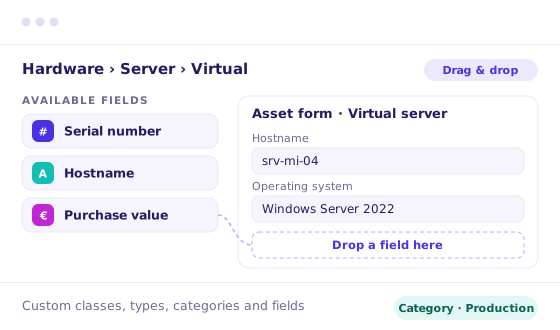
Define classes, types, categories and custom fields with dynamic forms and drag & drop. Every organization classifies its assets differently: with Deepser, the database adapts to you, not the other way around.
Classes, types and categories
Custom fields
Drag & drop forms
No data lost
Import and permissions
Start from the inventory you already have, securely
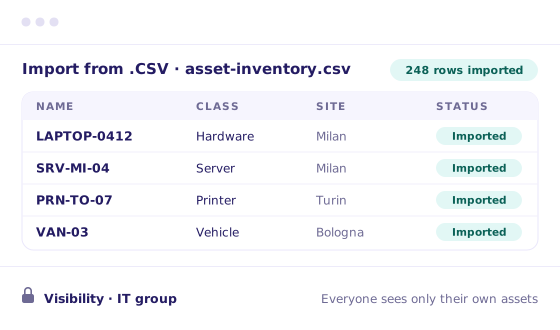
Import assets from .CSV and .XML files without re-entering anything by hand, and track any company asset, even beyond IT. With group and user permissions, everyone sees and edits only the assets they are responsible for.
Import .CSV and .XML
Any company asset
Group and user permissions
Organized inventory
Cloud sync
Cloud assets always up to date in the CMDB
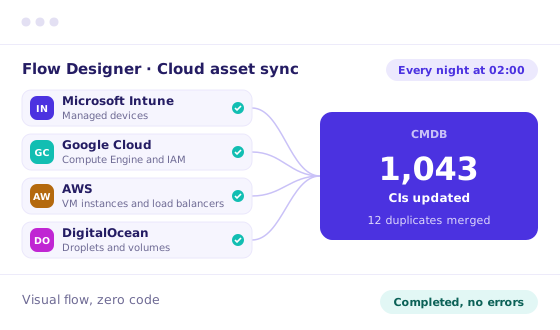
With the Flow Designer you connect your cloud platforms through visual flows: devices, virtual machines and users are discovered and updated automatically, on the schedule you choose. No manual exports, no developers to involve.
No-code flows
Scheduled updates
No manual exports
Ready-to-use CIs
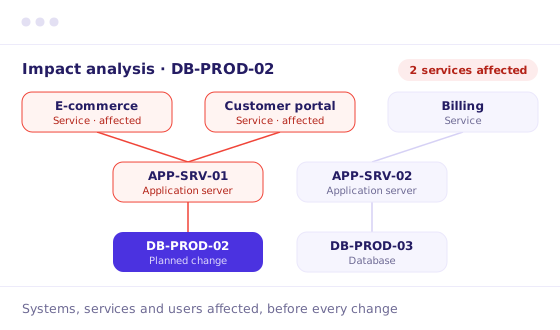
Relationships and impact
Predict the impact of every change
Every item is linked to the ones it depends on and to the services it supports. Before an update or during an outage, you immediately see which systems, services and users are affected, on your infrastructure or your customers’.
Dependency map
Impact analysis
Linked services
Customer infrastructures
Help Desk and contracts
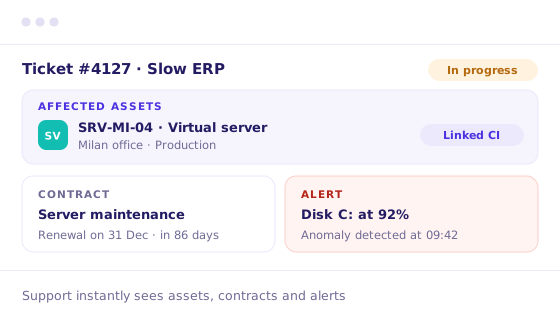
Assets linked to tickets, contracts and alerts
Every ticket shows the assets involved, so support resolves faster. Assets are linked to contracts to keep renewals and expirations under control, and alerts on anomalies and outages let you step in before the problem spreads.
Assets in tickets
Renewals and expirations
Anomaly alerts
Faster support
Discover the full platform, no commitment
AI Studio: the engine, not just an add-on
AI runs under every layer of the CMDB: inventory, relationships, changes. And it always shows you where every piece of information comes from.
The CMDB keeps itself in order
AI suggests the type and category of imported assets and merges duplicates, so the inventory stays clean and reliable.
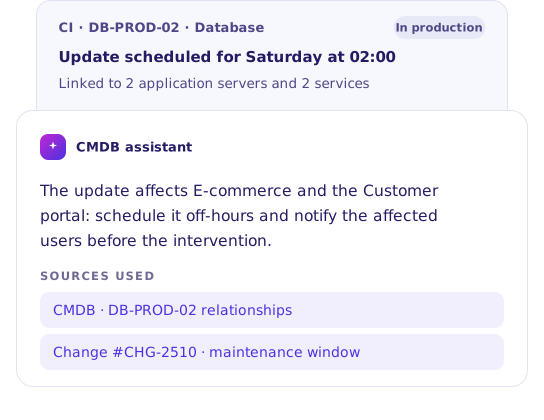
The impact of a Change, before you make it
AI reads the relationships between CIs and shows you which services and users each change will affect.
Every ticket comes with its context
When a device fails, AI links the asset to the request and suggests the action, with history and sources at hand.
Our customers’ results
Discover how they improved results and productivity thanks to our platform

100% traceability: Condability strengthens operational control with Deepser
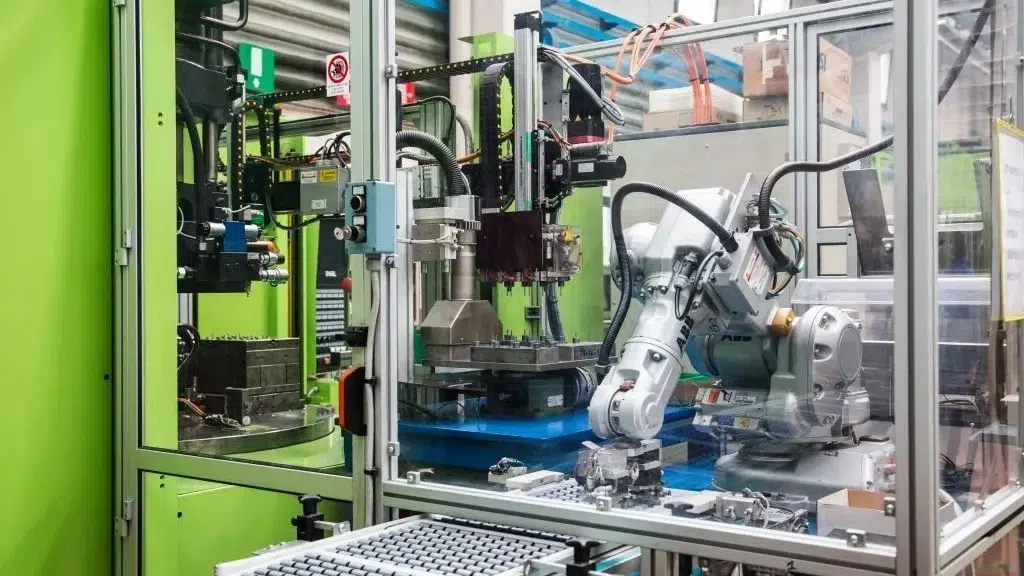
From 15 to 1 minute: Meccanostampi integrates tickets and endpoints and speeds up IT
Gamma optimizes ticket management and cuts average times by 65%

Go-live in a week: Bassadone Auto Italia speeds up operations for the Mitsubishi network

Grid IT overcomes email-based management with Deepser and gives autonomy to the IT team
100% traceability: Condability strengthens operational control with Deepser
From 15 to 1 minute: Meccanostampi integrates tickets and endpoints and speeds up IT
Gamma optimizes ticket management and cuts average times by 65%

Go-live in a week: Bassadone Auto Italia speeds up operations for the Mitsubishi network
Grid IT overcomes email-based management with Deepser and gives autonomy to the IT team
The CMDB module is included in the license:
Starter
Plus
Enterprise
Simple pricing plans that meet your needs
We offer different packages starting from three operator seats. Bigger teams unlock larger discounts.
AI STUDIO
Get more value from the tools you already use
Connect Deepser to your existing technology stack and expand the platform’s capabilities without replacing what already works.





What Deepser offers
Low-code platform
Allows you to configure and customize processes quickly, ensuring autonomy even without technical development.
Intelligent Workflows
Support activities in real time by analyzing data and updates to trigger decisions within workflows.
Multi-LLM
Combines different language models to deliver effective responses based on diverse operational needs.
Verified on security, awarded on support
Every day we handle sensitive data, credentials, access and company information. Protecting it doesn't rely only on internal procedures, but on certified standards.

ISO 27001
ISO 9001

ACN CERTIFIED

GDPR
MOST RECOMMENDED

4.6 ON CAPTERRA
Frequently asked questions about the CMDB
What is a CMDB?
A CMDB (Configuration Management Database) is the database that collects all of an organization’s configuration items – hardware, software, services, contracts and people – together with the relationships between them. It is one of the pillars of ITIL processes.
What is the difference between a CMDB and IT Asset Management?
IT Asset Management focuses on the lifecycle and economic value of assets: purchases, licenses, expirations, disposals. The CMDB instead describes how items are configured and linked to each other, to understand the impact of failures and changes. In Deepser you can use them together: discover Deepser’s ITAM software.
Can I import the assets I already have in Excel?
Yes. You can import data into the CMDB from .CSV and .XML files and start right away from the inventory you already have. For cloud sources, you can automate synchronization with the Flow Designer.
Does the CMDB integrate with Microsoft Intune, AWS and Google Cloud?
Yes. With the Flow Designer you sync Microsoft Intune, Google Cloud, AWS and DigitalOcean assets into the CMDB through scheduled visual flows, without writing code.
Is Deepser available in cloud and on premise?
Yes, the choice is yours. The two versions have the same features and the same cost per license.
Can I try the CMDB for free?
Yes. The free trial lasts 14 days and does not require a credit card. Activate your trial and start right away.
