


Introduction to Office Automation
Over the past decades, office automation has profoundly transformed the way people work, redefining business processes and introducing a new level of efficiency and productivity.
Office Automation: What exactly is it?
Office Automation is the integration of advanced technologies and digital tools to automate and optimize a company’s operational processes. These solutions include document management software such as Factorial, internal communication tools such as Microsoft Teams, and workflow creation systems such as Zapier, among others.
Time being the most valuable resource, adopting office automation systems means having the opportunity to improve workflow, freeing up resources for higher value-added strategic activities. Modern companies operate in an ever-changing market where speed and accuracy are key success factors. Investing in automation is not just a technological choice, but a strategic decision that can determine a company’s growth and sustainability.
In addition to streamlining business processes, office automation is an enabler of innovation. Companies that adopt these tools can offer improved customer service and gain a competitive advantage in an increasingly dynamic market.
Moreover, office automation is not only about technology, but also about a change in corporate mindset. Adopting these tools requires an organizational culture geared toward continuous improvement, where innovation is an integral part of business strategy. With this in mind, companies that promote a conscious adoption of automation technologies gain not only operational but also strategic benefits, creating sustainable value in the long term.
The Role of Office Automation in the Business Context.
Office automation plays a crucial role in improving business operations. Digitizing processes not only speeds up activities, but also reduces operational costs, improves data security, and increases internal transparency.
In an era when hybrid and remote working has become the norm, office automation supports collaboration among geographically distributed teams. It enables secure access to business information wherever you are, proving particularly useful in scenarios such as emergency management, business continuity and rapid response to market changes.
Growing companies can gradually implement new solutions to support their needs, providing a higher return on investment and reducing the risks associated with major structural changes. In addition, these tools are able to adapt to new market needs, making the company more resilient and competitive.
Managing innovation through office automation is not limited to large companies. SMEs can also benefit from scalable and affordable tools, achieving tangible benefits such as optimizing resources and reducing errors. This makes office automation a key element in fostering competitiveness even in traditionally less technological industries and smaller companies.
Office Automation: An Overview of Tools
Office automation includes various tools, each designed to address specific needs. In the upcoming section, you will find a detailed overview of some of these:
Document Management Systems
From contracts to financial reports, efficient document management is critical. Tools such as Google Drive, Dropbox, Microsoft OneDrive and advanced solutions such as Factorial allow documents to be stored, organized and shared securely and quickly. They offer features such as digital signatures and full-text search to improve productivity.
These systems also ensure regulatory compliance and controlled access, which are critical for regulated industries such as finance or health care. Centralized storage reduces the risk of data loss and ensures that information is readily available when needed.
Communication and Collaboration Tools
Communication is the cornerstone of productivity. Platforms such as Microsoft Teams, Slack, Zoom, and Discord combine chat, video calling, and file sharing into a single platform, enhancing collaboration and reducing dependence on traditional email.
Integration with other office automation tools makes work even easier: for example, a task assigned on Microsoft Teams can be automatically tracked on a project management system.
These tools facilitate real-time information sharing, improving speed of response and ensuring that all team members have access to the information they need to make informed decisions.
Project Management Software
Solutions such as the Deepser’s project management module, make it easy to create tasks, assign responsibilities and monitor progress. These tools are ideal for companies operating with agile methodologies or managing structured projects.
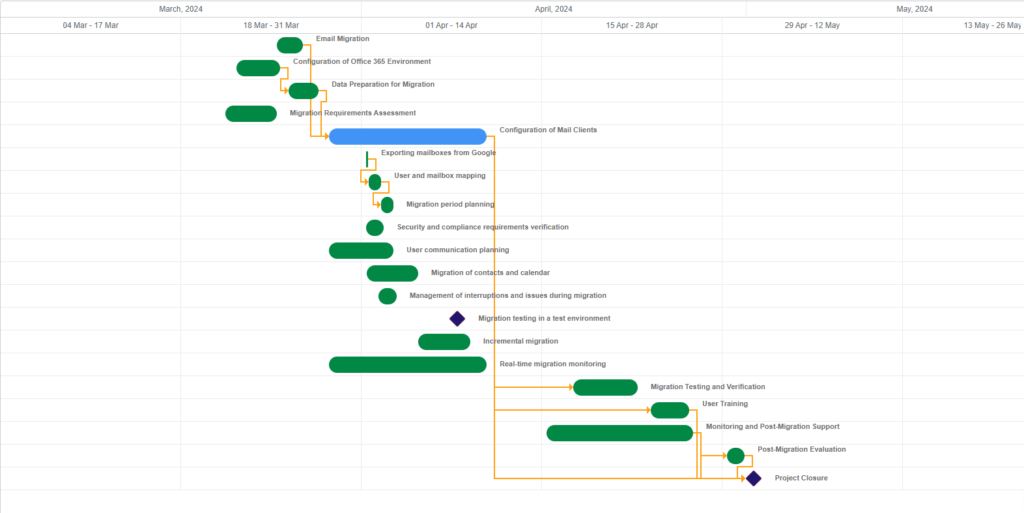
The ability to integrate advanced reporting capabilities enables real-time monitoring of team performance and identification of bottlenecks. In addition, these tools offer customization options that allow workflows to be tailored to specific business needs, improving consistency and transparency in daily operations.
Workflow Automation
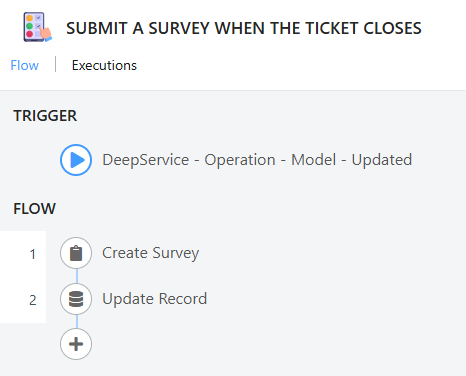
Workflow automation eliminates manual and repetitive tasks. Tools such as the Deepser workflows module, enable automated workflows for processes such as notifications, document approvals and request management.
A practical example of Workflow that we have implemented in Deepser, allows us to automatically send a survey to customers when their ticket is closed, obtaining valuable feedback to improve service quality.
The Benefits of Office Automation
The adoption of office automation is a strategic step that offers numerous benefits, both tangible and intangible. As mentioned earlier, among the main benefits are increased operational efficiency, significant reductions in human errors, and optimization of business expenses. However, the benefits do not stop there, and it is important to explore additional key benefits that make office automation an indispensable choice for modern businesses.
Digitization of processes makes it possible to implement strict access controls and adopt advanced cybersecurity solutions. In an environment of increasing cyber threats, protecting corporate data has never been more critical. Companies can ensure the integrity and confidentiality of sensitive information, reducing the risk of attacks and data breaches.
Another significant benefit is environmental sustainability. The adoption of automated technologies tangibly reduces the use of paper, energy, and other physical resources. This not only helps reduce operational costs but also improves the corporate image in the eyes of customers and stakeholders who are increasingly concerned about environmental impact. According to IDC, companies that invest in office automation can reduce their carbon footprint by 20 percent, a figure that highlights the importance of green solutions in modern business.
Finally, automation significantly increases employee satisfaction. By eliminating repetitive and often monotonous tasks, staff can focus on more strategic and rewarding activities. This not only improves morale, but also increases productivity and reduces turnover, creating a more positive, collaborative and stimulating work environment. When employees feel valued and free to fulfill their potential, the entire company benefits.
Challenges in Implementing Office Automation.
Despite its many advantages, the implementation of office automation can present some significant difficulties:
- High Initial Costs: The purchase of software, hardware, and staff training represent a considerable investment that can discourage small and medium-sized enterprises (SMEs) in particular. However, the return on investment (ROI) in the long run tends to more than offset these costs.
- Resistance to Change: Many employees may perceive automation as a threat to their role or fear that it will increase the complexity of operations. This cultural obstacle requires careful management and transparent communication to overcome.
- Integration Issues: Ensuring that new tools work smoothly with existing systems is a technical challenge that requires planning and specific expertise.
- Adaptation Period: Transitioning to new systems can temporarily slow productivity, as staff need time to learn and adapt to new processes.
- Security and Privacy: With increasing digitization, it is critical to protect corporate data from possible cyber threats by adopting appropriate and compliant security solutions.
- Scalability: Some tools may not easily adapt to business growth, making forward planning necessary when choosing solutions.
How to Overcome Challenges and Implement Office Automation
To successfully meet the challenges of office automation, targeted and planned strategies are essential:
- Business Needs Analysis: Identify the areas that would benefit most from automation, assessing the processes that are most burdensome and susceptible to manual error.
- Employee Involvement: Clearly communicate the benefits of automation and involve employees early on, gathering feedback and addressing their concerns.
- Continuing Education: Provide an effective training program to ensure that staff know how to make the best use of new tools, promoting confidence and competence.
- Monitoring and Improvement: Regularly evaluate the performance of implemented systems, collecting data to make continuous improvements.
- Strategic Partnerships: Partner with experienced vendors, such as Deepser, to simplify implementation and gain ongoing technical support. Consulting with a dedicated project manager can make a difference in optimizing processes.
- Adopt a Gradual Approach: Start with small pilot projects to test and evaluate the effectiveness of solutions before extending them enterprise-wide.
The Future of Office Automation
The future of office automation is closely linked to technological innovations:
- Artificial Intelligence (AI) and Machine Learning (ML): make it possible to analyze large amounts of data, automate complex processes, and improve business decisions. Tools based on these technologies are able to continuously learn and adapt, offering increasingly personalized solutions.
- Robotic Process Automation (RPA): RPA automates repetitive and manual tasks, such as data processing and document management, dramatically reducing the margin of error and increasing operational efficiency.
- Integration with IoT Systems: internet of Things (IoT) enables physical devices to be connected to automation systems, improving real-time monitoring and control of business operations.
- Advanced Collaboration: Tools such as Microsoft Teams and Zoom are evolving to more immersive platforms, integrating features such as augmented and virtual reality to enhance collaboration among remote teams.
Conclusion
Office automation is not just a technological advancement, but an indispensable transformation to ensure the competitiveness and sustainability of companies in the long run. Investing in automation solutions means embracing a more efficient, secure and innovative future.
Are you considering adopting an office automation solution?
Book n discovery call to learn how Deepser, our Enterprise Service Management software, transforms your business processes. With the support of a dedicated project manager, we will analyze your specific needs and customize Deepser to streamline processes, reduce operational costs, and significantly improve your team’s productivity.



