


Workflows, what are they and why are they important?
Imagine a company where every project flows smoothly, where communication is clear and responsibilities clearly defined.
This is possible through the effective implementation of a workflow. An enterprise workflow is a structured system for managing workflows to automate and streamline business activities. Essentially, it defines a sequence of steps required to complete a process, assigning tasks, setting deadlines and monitoring progress.
Its proper implementation can make the difference between operating in a chaotic or systematized manner, allowing teams to focus on what really matters: results and innovation.
In an increasingly complex business world, a well-designed workflow enables strategic resource management, reducing downtime and increasing customer satisfaction.
Importance of an effective workflow
An effective workflow is the key to achieving exceptional results, minimizing errors and maximizing productivity. When an organization implements a structured workflow, every team member knows exactly what they need to do.
This clarity eliminates ambiguity, allowing each phase of business operations to flow with precision and enabling goals to be achieved faster.
Informed decisions, made in real time through a transparent workflow, fuel a culture of performance. This approach not only improves operational efficiency, but also fosters a more collaborative and motivating work environment. Transparency in processes enables teams to quickly identify areas for improvement and act promptly to optimize results. In this way, each member of the organization actively contributes to business success, creating a virtuous cycle of growth and innovation. Mutual trust is strengthened when everyone knows how and when he or she contributes to the common success.
Ultimately, an effective workflow not only optimizes existing resources, but also creates a fertile space for continuous innovation. Every project is traceable, every outcome measurable, paving the way for new opportunities for improvement and growth.
How is a workflow structured?
A workflow consists of several phases, each with specific activities and goals that must be achieved.
First, it starts with planning, during which clear objectives and the necessary resources are identified. This phase is crucial, as it sets the guidelines that will be followed throughout the process, determining priorities and the flow of activities. Next comes execution, where the planned activities are actually carried out.
During execution, the progress of the workflow is monitored. This monitoring is critical to ensure that everything is proceeding according to plan and to identify any problems or delays. At this stage, continuous communication within the team helps to maintain a high level of efficiency and collaboration.
Finally, we come to the evaluation and continuous improvement phase. This is where the results obtained are analyzed, whether goals have been met, and any areas for improvement are identified. This phase not only closes the loop of the current workflow, but provides valuable information for optimizing future processes, ensuring constant progress and adaptation. With an effectively structured workflow, organizations can meet challenges with confidence, innovate and grow in an increasingly competitive market.
Types of Workflows
There are three main types of workflows:
- IT Workflows: Focused on automation of IT and technology processes.
- Workflows for Employees: Dedicated to the management of internal activities and human resources.
- Workflows for Customers: Focused on optimizing customer experience and sales processes.
Key Features
Using an automated workflow management tool you will be able to:
- Automatically schedule maintenance activities based on time and usage
- Automatically assign tasks for constant collaboration among departments and activities for corporate Change Management processes
- Integrate real-time data with popular business apps
- Manage approvals, deadlines and automatic renewals of contracts
- Check acquisitions and disposals of company assets at a glance
How to create an effective workflow
What are the steps involved in creating a workflow with workflow software? following are the basic steps:
Define the desired outcome.
It consists of clearly understanding what goals you want to achieve. Every workflow must be built around specific outcomes that are concrete, measurable and relevant. Therefore, precisely delineating goals is essential to ensure that each step in the workflow contributes to overall success.
Mapping out the steps
Organizing activities into a logical and functional sequence is crucial. After listing all the steps, it is important to link them so that you have a clear view of the process from start to finish. This step facilitates understanding and reduces the risk of errors.
Implement continuous monitoring and feedback tools. Workflow management software can greatly improve visibility and control over processes, allowing each team member to easily access information and track progress in real time. Effective monitoring enables timely changes to be made, ensuring maximum workflow efficiency at all times.
Draw the workflow
- Create a visual diagram of the process
- Set rules and conditions for each step
Monitor and optimize
- Verify performance
- Make changes based on the results obtained
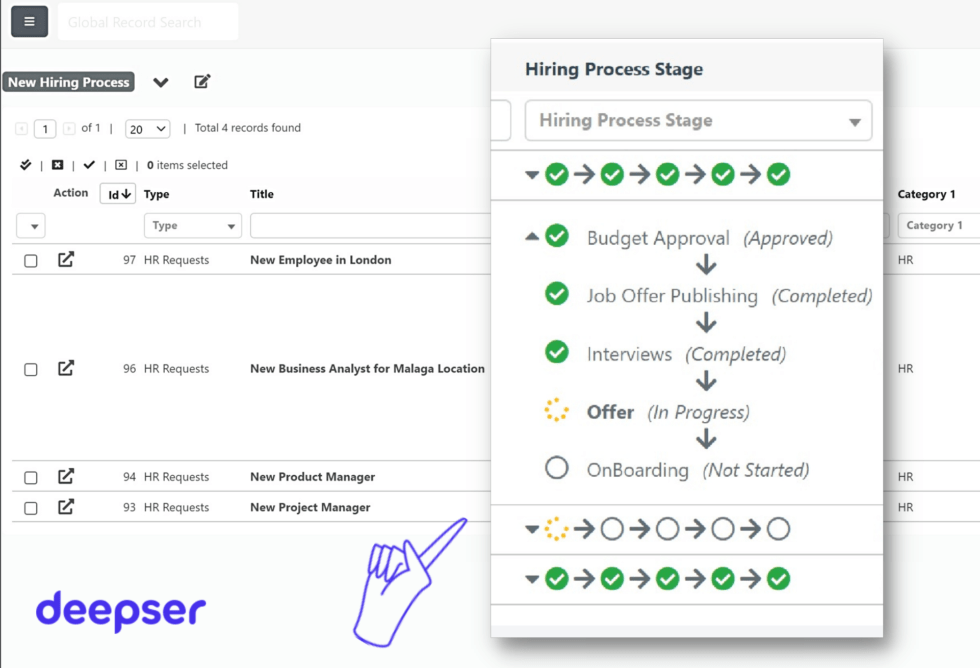
Benefits of a proper workflow
An effective workflow brings countless benefits, transforming the complexity of business activities into simple, manageable processes.
First of all, a structured workflow helps reduce errors and inefficiencies, allowing teams to focus on key objectives. Each well-defined step brings with it greater clarity and less room for error, thus improving the quality of work and customer satisfaction.
In addition, a well-designed workflow promotes collaboration among team members. This promotes open and effective communication, which is essential for optimizing resources and accelerating the achievement of desired results.
Finally, an optimal workflow provides a framework for continued growth and innovation. It allows areas for improvement to be identified quickly, adapting flexibly to changes and new challenges. Process optimization makes the organization more resilient and able to successfully cope with periods of transformation and growth.
Let’s discover the benefits in detail:
Simplification of internal processes
A well-structured workflow makes it possible to greatly simplify the management of daily activities within the company. By automatically assigning tasks and clearly defining roles and responsibilities, processes become more transparent and fluid.
This is particularly beneficial for medium and large companies, where organizational complexity can often slow down operations.
Increased productivity
Adopting workflow software allows processes to be standardized, leading to a significant increase in productivity.
By automating repetitive tasks and eliminating redundant activities, there is a significant reduction in operational time and costs.
In addition, the increased efficiency results in tangible improvements in task management and interpersonal relationships among team members.
Errors reduction
Having a comprehensive and well-defined view of all business processes enables objectives to be achieved more quickly, avoiding delays and hitches.
Automatic data capture and integration with other business systems dramatically reduce the possibility of manual errors.
This not only improves the accuracy of operations, but also eliminates the need to invest time in corrections and rework.
Real-time data tracking
An effective workflow management system (workflow manager) allows data from different applications to be monitored and tracked in real time.
This ability to integrate information from various sources, such as CRM, ERP, email, and IoT devices, provides a comprehensive and up-to-date view of business activities.
Constant tracking allows inefficiencies and opportunities for improvement to be quickly identified, as well as providing precise analysis of business performance.
Improved work quality
Implementation leads to greater satisfaction for both employees and customers.
By automating repetitive tasks and optimizing workflows, a more efficient and less stressful work environment is created.
Collaboration between departments is enhanced through clear assignment of roles and transparency of processes.
This allows employees to focus on the highest value-added activities, achieving their goals faster and increasing job satisfaction.
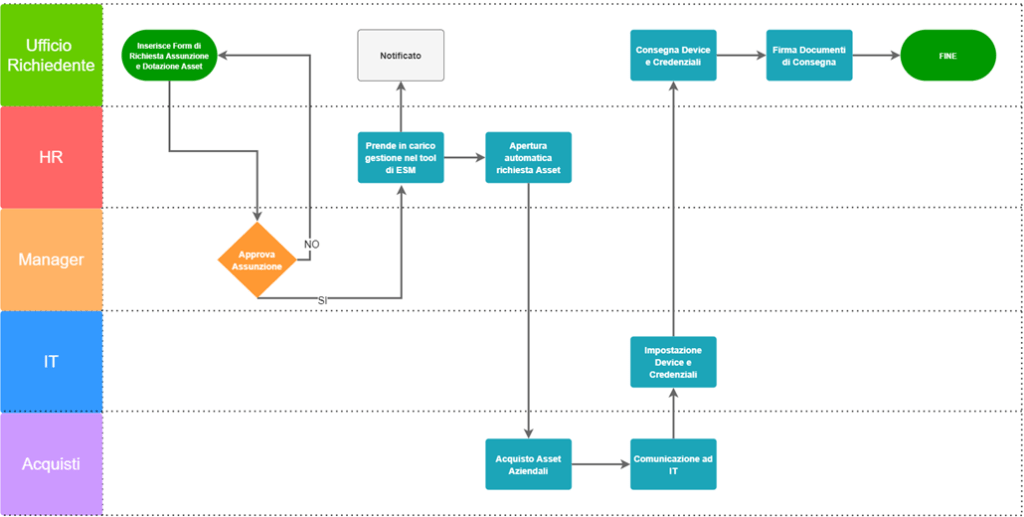
Workflow Examples
A common example of a workflow is one used in project management.
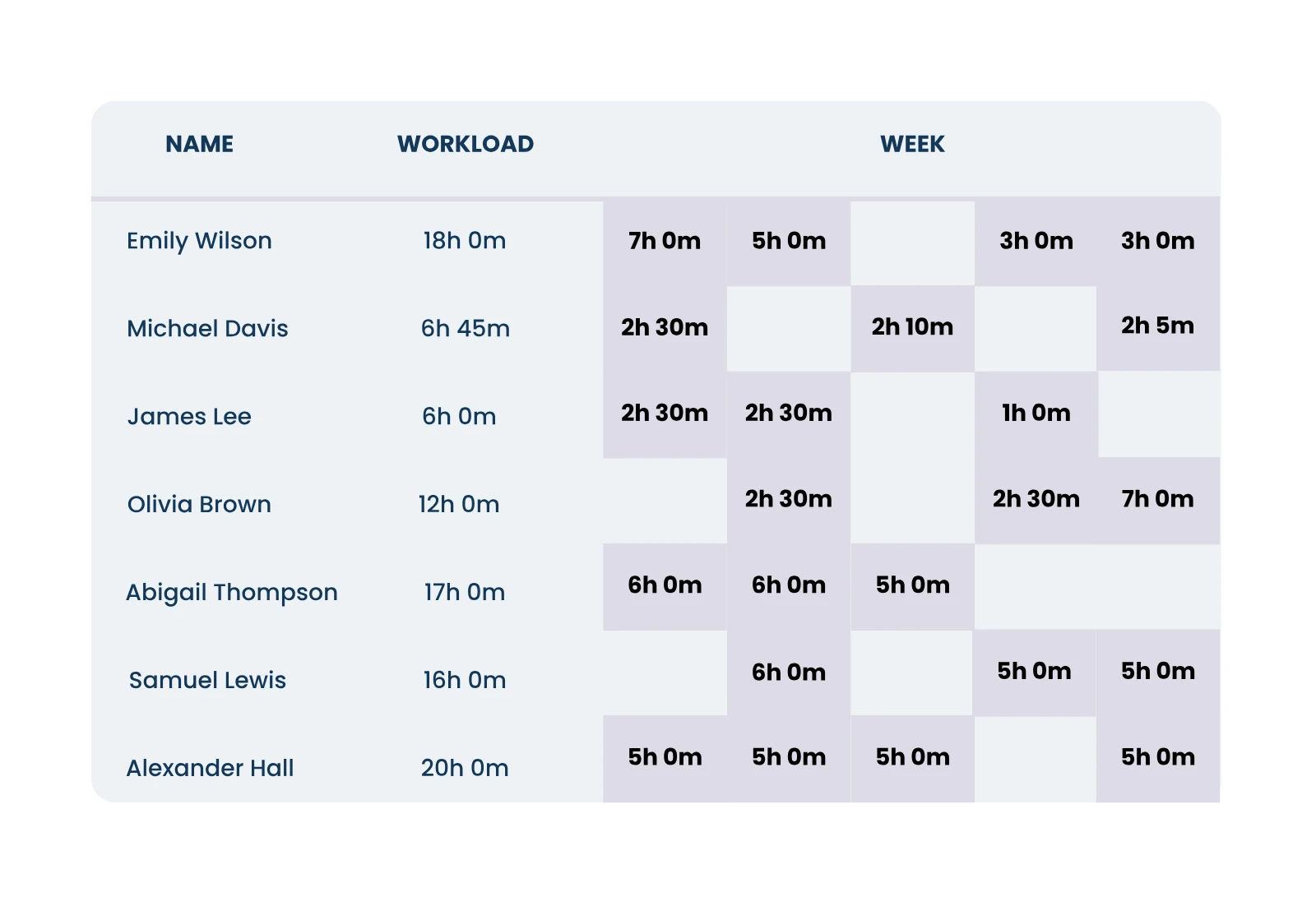
In this context, a workflow may include initial planning, task distribution, task supervision, and final review. Using tools such as the project management module in Deepser, we can manage the workload for each resource and monitor progress in real time.
In accounting, a workflow can facilitate invoice processing. From the receipt of invoices, to their verification, to final approval and entry into accounting systems, every step is tracked and monitored.
Finally, in the area of marketing, a workflow can be used for campaign planning and execution. From content creation, to scheduling social media posts, to analyzing results, each step is coordinated to maximize the efficiency and effectiveness of operations. Implementing these workflows enables organizations to maintain high levels of productivity and quality.
These are just a few examples of workflows. Others that should certainly be highlighted include simpler management of contract approvals, deadlines and renewals, or, for example, automatic scheduling of maintenance, in fault management, based on time and usage.
In general, digitizing your company’s processes with a workflow system leads to decisive improvement on all fronts: quality and quantity of time, productivity, improved performance and safety in all phases of management processes.
Some sectors that can benefit from workflows:
- IT Sector: IT Workflow for Technical Support Request Management
- Human Resources: With Workflow hr to manage the onboarding process for new employees
- Sales: Lead qualification and opportunity management
- Manufacturing: Quality control and inventory management
- Customer Service: Managing customer complaints and inquiries.
Common mistakes in workflows
Not defining clear roles
Communication overload can cause many distractions. If team members do not know who to contact, it can lead to confusion and slowdowns in the work process. Clearly identifying who is responsible for each step in the workflow is critical for smooth execution.
Forgetting feedback
Do not update the workflow with lessons learned. Periodic reviews help identify points for improvement. A static workflow can become ineffective if it is never revisited and optimized.
Ignoring extensive documentation
A well-documented workflow not only ensures operational consistency, but also serves as a guide for new team members and facilitates problem solving. Investing time in preparing detailed and up-to-date documentation proves to be a long-term benefit for any organization.
When is it necessary to review workflow?
Optimizing business processes is crucial to maintaining high efficiency and ensuring high-quality results over the long term. Reviewing your workflow is essential.
Changes in the market or technologies may require urgent revision.
Continuous improvement is key: identifying internal inefficiencies helps refine the workflow, ensuring that resources are used optimally, saving time and costs. Periodic review also provides opportunities for innovation.
When you notice slowdowns or dissatisfaction among staff, it is a clear sign that the workflow may need revamping. Analyzing and adjusting internal processes can generate a more harmonious work environment, fostering motivation and productivity. Revision means constant adaptation and improvement, going beyond expectations. Ultimately, reviewing workflow on a regular basis turns challenges into opportunities for growth and excellence.
Continuous workflow improvement
An effective workflow continually evolves.
Through continuous improvement, teams refine and optimize their processes. This involves adopting new technologies, constantly reviewing procedures, and analyzing past performance. Relentlessly, efforts are made to reduce time and increase the quality of operations.
Adaptability is essential for success.
Regular analysis of workflows leads to-and requires-a continuous search for innovative solutions, improving operational efficiency and overall quality.
Each implemented change aims to ensure a harmonious and productive workflow ready to meet market challenges. With continued commitment to excellence, teams achieve higher and higher standards, strengthening the organization’s competitiveness.
Conclusion
Adopting a workflow management system is a key step toward digitizing and optimizing business processes.
With advanced tools such as Deepser, which offers integrated ITSM capabilities, companies can respond promptly to changing business needs, improving efficiency, productivity, and employee and customer satisfaction.
Are you ready to transform your business processes with a workflow management system? Find out how Deepser can help your business: Request a free demo



